
Go to documentation repository

Documentation for Axxon PSIM 2.0. Documentation for other versions of Axxon PSIM is available too.
Previous page Next page

To configure the event viewer database synchronization, use the settings panel of the Computer object on the Protocol synchronization tab.
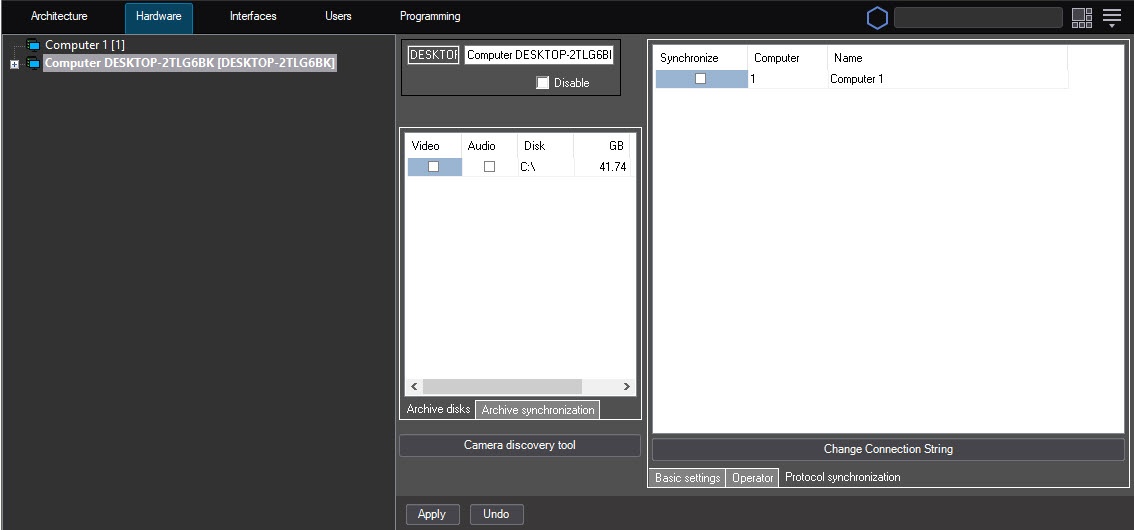
To configure the synchronization, do the following:
- Go to the Protocol synchronization tab (1).
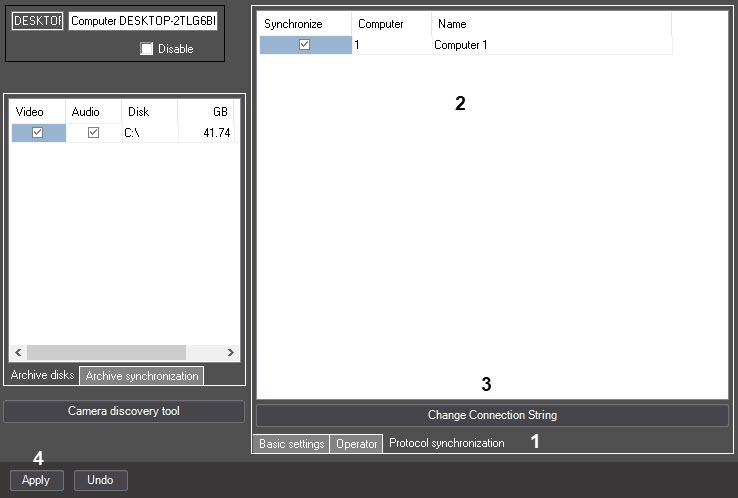
- In the Synchronize column, set the checkboxes next to the computers with the event viewer databases that you want to synchronize on this server (2).
- Set the connection string in the event viewer database on remote computers:
- Select the cell corresponding to the required computer in the line of the table.
- Click the Change Connection String button (3).
- In the opened Data communication channel window, configure the connection to the event viewer database located on the selected computer.
You can configure the connection using the standard Windows tools, as described on the Microsoft reference website (http://msdn.microsoft.com/). - Repeat a–c steps for all required computers.
- Click the Apply button to save the settings (4).
Configuring the event viewer database synchronization is complete.
Overview
Content Tools