
Go to documentation repository
Previous page Next page
The license plates of passing vehicles are automatically recognized and subsequently displayed in the Vehicle Tracer interface window. By default, the recognized license plate is displayed after the vehicle leaves the camera FOV.
It is possible to display the license plate on the screen before the vehicle leaves the frame only if you use the VT, AR-Auto, RR (including the RR vendor and model recognizer module) software modules.
To set up the display of license plate recognition results, do the following:
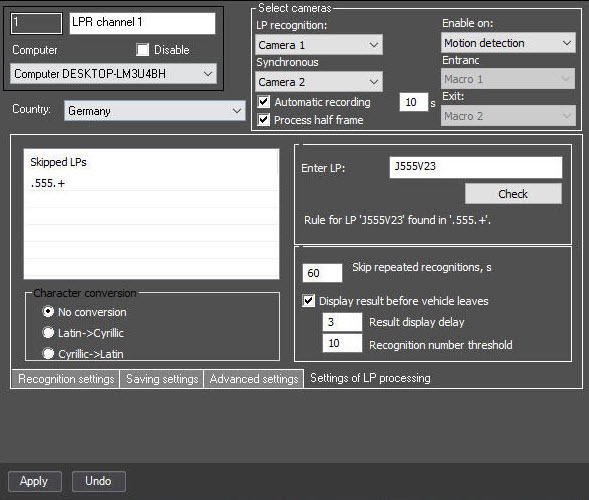
In the Result display delay field, specify the time in seconds after which the recognition result is displayed. This period of time starts after the first license plate recognition.
Note
This parameter is enabled if you set the Display result before vehicle leaves checkbox.
In the Recognition number threshold field, specify the number of reliable license plate recognitions, upon reaching which the recognition result is displayed. The recognition number counter is cumulative and is not reset in case of temporary loss of a given area or false recognitions.
Note
This parameter is enabled if you set the Display result before vehicle leaves checkbox.
Note
To save the changes, also click the Apply button on the settings panel of the corresponding software module.
The display of license plate recognition results is set up.
Note

