
Go to documentation repository

Documentation for Axxon PSIM 2.0. Documentation for other versions of Axxon PSIM is available too.
Previous page Next page

To provide the effective and stable performance of Axxon PSIM, take into account the following recommendations on using the database:
You must synchronize the databases of servers and Remote Administrator Workstations with the administration server database to provide the ability of the centralized administering of the video surveillance and audio control system.
Note
We recommend configuring the automatic backup of the Axxon PSIM database in MS SQL Server, for example, once a week (by default, the automatic backup isn't configured).
- If you want to store the registered events in the system in the centralized way during the long-term period, we recommend configuring Axxon PSIM on servers and Remote Administrator Workstations to store events in the Events log database separately from the Configuration database (see Extracting event viewer into individual database).
If you use the protocol of the dynamic host configuration (DHCP), make sure that the TCP/IP protocol priority for local databases is the highest. Otherwise, if you disconnect the network cable, the communication between Axxon PSIM and its local database located on the same computer where Axxon PSIM is installed can be lost. To view and prioritize network protocols, use the SQL Server Configuration Manager utility:
Run the SQL Server Configuration Manager utility (Start → Microsoft SQL Server Express 2014 → Configuration Tools).
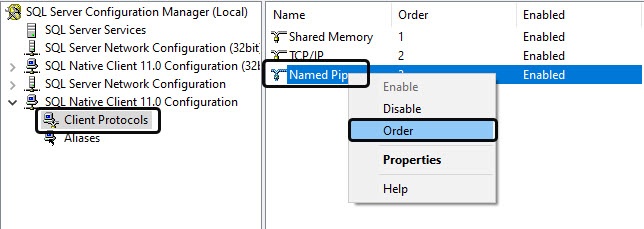
In the left part of the utility's interface window, click the title of the SQL Native Client Configuration list, and then select the Client Protocols item in the drop-down list. In the right part of the window, right-click any protocol in the list and select the Order item in the context menu that appears.
Note
Starting with SQL Server 2022 (16.x) and SQL Server Management Studio 19 versions, the SQL Server Native Client is no longer supplied.
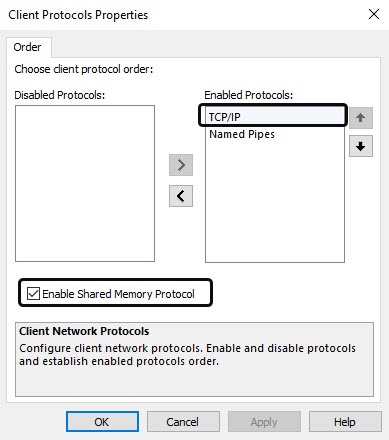
- In the Client Protocols Properties window that opens, the list of client protocols for the local SQL databases in descending priority order is displayed in the Enabled Protocols field. The TCP/IP line must be located at the very top of the Enabled Protocols list. Also, you must set the Enable Shared Memory Protocol checkbox.
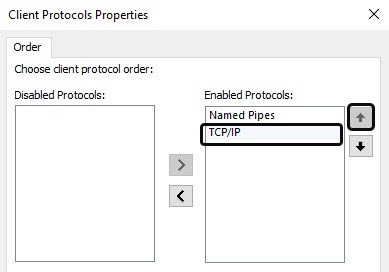
- If the TCP/IP line isn't located at the very top of the Enabled Protocols list, use the Up button to move it.
Overview
Content Tools