
Go to documentation repository
Documentation for Axxon One 3.0/3.1 version. Documentation for Axxon One 2.0 version is also available.

To create the Group object:
- Click the Configuration management button → the Devices tab → the Groups tab.
- Click the Add group button.
Note
- By default, an object (whose name is the same as the Axxon-domain) is available, including all cameras that have been created in the system. This object is called the main group. You cannot delete the main group and the cameras in this group.
- Starting with Axxon One 3.1, cameras, ACFA devices, and event sources are displayed in the tree in separate folders.
- In the Name field, enter the name of the group.
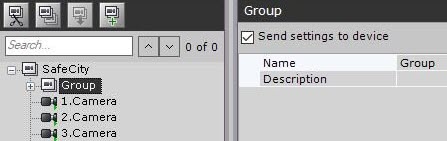
- In the Description field, enter a description of the group.
- Click the Apply button. To cancel the actions, click the Cancel button.
The Group object is created.
Overview
Content Tools