
Go to documentation repository

Documentation for Axxon PSIM 2.0. Documentation for other versions of Axxon PSIM is available too.
Previous page Next page

On this page:
Purpose
The incident manager is used for processing events and generating reports (see Control and handling of events using the incident manager).
Functions
The incident manager has the following functions:
- Event handling according to a pre-configured script.
- Automatic execution of macros that are started by certain operator actions.
- Generation of a report on the event and operator actions.
Interface description
The incident manager interface is shown in the figure:
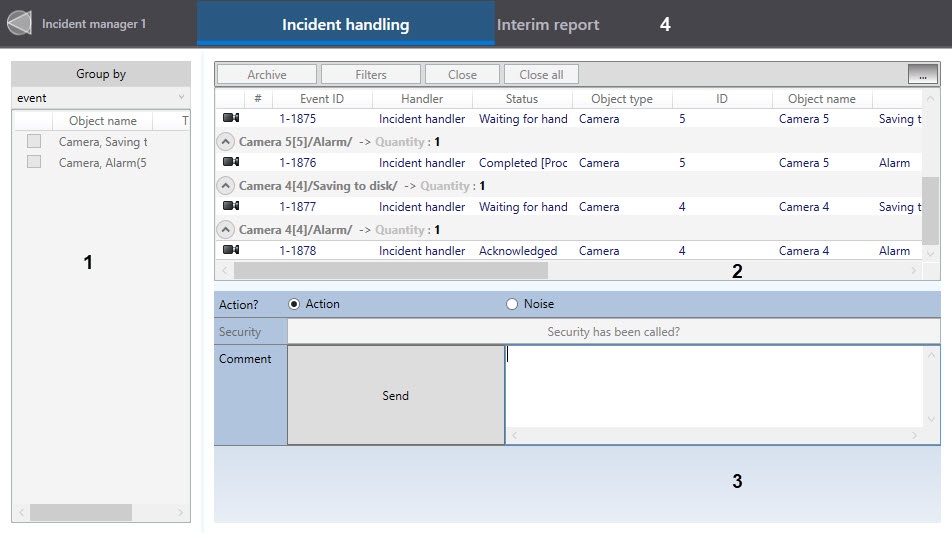
The incident manager interface consists of three parts:
- Event grouping panel (1).
The events can be grouped by:- Object.
- Event type.
- Region.
- No grouping—all events are displayed.
- Table with a list of events (2).
The following information is displayed for each event:- Indicator of the presence of the camera associated with the event
 .
. - #—the column displays the indicator of event locking.
Display of locking:- Locked remotely—
 .
. - Locked locally—
 .
.
- Locked remotely—
- Event ID.
- Incident handler—the name of the incident handler that handles the event.
- Event status.
- Object type.
- Object ID.
- Object name.
- Action—description of the event.
- Time the event occurs.
- Priority.
- Computer—the name of the computer from which the event is received.
- Time (sec)—the number of seconds since the event occurred.
- Last comment—only the last comment entered while handling the event.
- All comments—all comments entered while handling the event.
- Additional information.
- Indicator of the presence of the camera associated with the event
- Event handling interface (3).
The logic of event handling is configured based on the requirements of the configured security system (see Creating and configuring event handling logic).
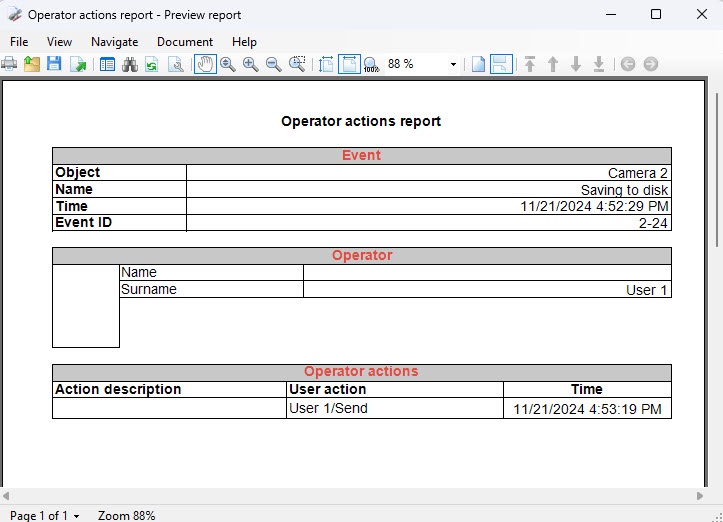
To go to the report at any time, click the Interim report button (4).
The report is built on the basis of the operator's actions during event processing. The report opens automatically after completing the entire chain of actions if it is specified in the incident manager settings.
Overview
Content Tools