
Go to documentation repository

Documentation for Axxon PSIM 2.0. Documentation for other versions of Axxon PSIM is available too.
Previous page Next page

You can use the operator query panel to control specific types of PTZ devices.
Below there is an example of how to control the Dynacolor-D7720 device.
To display the operator query panel for controlling the PTZ device, select the Dynacolor-D7720 item in the Run menu of the Axxon PSIM main control panel.
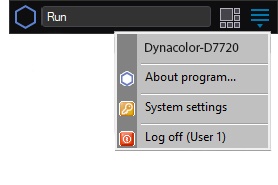
The window that opens allows controlling the Dynacolor-D7720 device that is connected to the system.
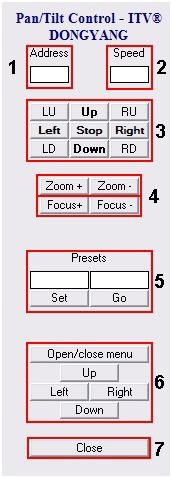
The table describes the interface of the control panel of the Dynacolor-D7720 device.
Element number | Function |
1 | PTZ device address |
2 | Conventional speed of the PTZ device when the direction changes |
3 | PTZ direction controls |
4 | Set the lens zoom (zooming in) and camera focus |
5 | Select and specify the PTZ user settings (presets) |
6 | Access and control of the embedded OSD menu of the Dynacolor-D7720 camera |
7 | Hide the Dynacolor-D7720 panel |
Note
Each type of system device has a separate control panel—operator query panel—that, in turn, has an appropriate interface and a set of functionalities. Besides, the name of the item for displaying the control panel in the Run menu is set while you configure the software and can differ from the name (type) of the PTZ device that corresponds to the given control panel.
Overview
Content Tools