
Go to documentation repository

Documentation for Axxon PSIM 2.0. Documentation for other versions of Axxon PSIM is available too.
Previous page Next page

To limit the access for the operator to play back the backup archive, do the following:
- Go to the Users tab in the System settings window (1).
- In the object tree that is below the User permissions button on the Users tab, select an object with the same name corresponding to the operator access permissions that must be changed (2).
The settings panel of the User permissions object is displayed in the right part of the System settings window.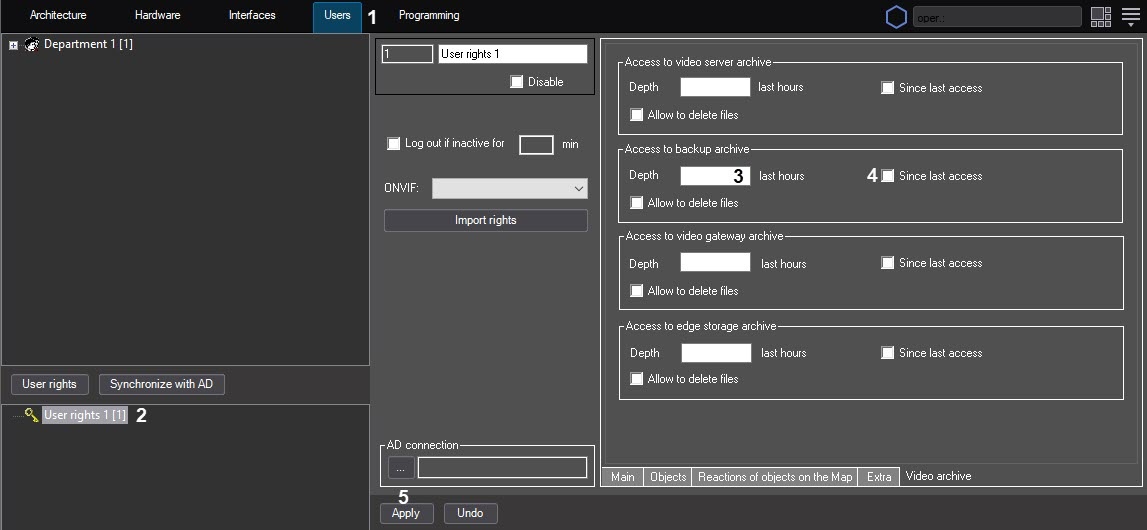
In the Depth ___ last hours field (3), enter the number of hours available for viewing.
Note
The number of last video archive hours available for viewing must be an integer.Note
Enter the 0 value in the Depth ___ last hours field to forbid access to the backup archive.If hours are counted since the last login in the system, set the Since last access checkbox (4). If you want to set the hours countdown since the current moment, then don't set the Since last access checkbox.
Note
If you set the Since last access checkbox and specify the number of hours available for viewing, the last hours are counted until the registration moment.Note
If you set the Since last access checkbox but leave the Depth ___ last hours field blank, the access to the backup archive playback isn't limited.
- Click the Apply button (5).
Limiting the backup archive playback by the operator is complete.
Overview
Content Tools