
Go to documentation repository

Documentation for Axxon PSIM 2.0. Documentation for other versions of Axxon PSIM is available too.
Previous page Next page

The hidden archive isn't displayed on the video surveillance monitor, but it is stored on the hard disk in the same way as the main archive. By default, the operator doesn't have the rights to view the hidden archive as well as to set or unset the "hidden" label to the archive records.
To give the operator the rights to certain operations with hidden archives, do the following:
- Go to the settings panel of the User rights object.
- On the Main tab, select the Archive group.
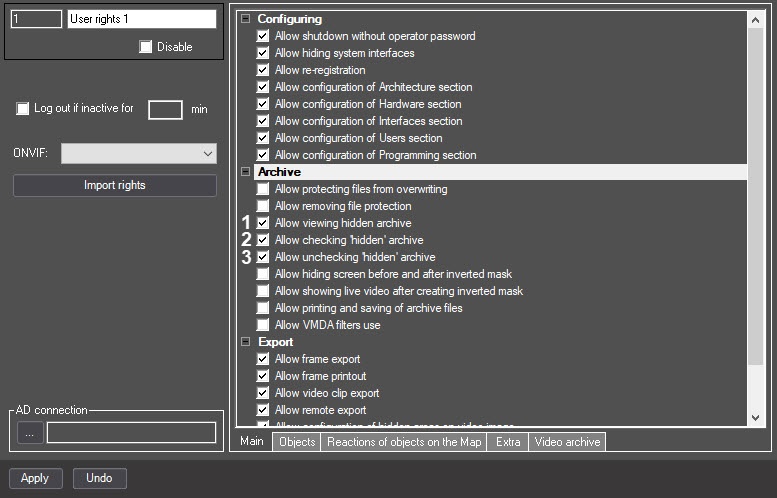
- Set the Allow viewing hidden archive checkbox (1) to give the operator the right to view the hidden archive.
- Set the Allow checking "hidden" archive checkbox (2) to give the operator the right to hide archive videos.
- Set the Allow unchecking "hidden" archive checkbox (3) to give the operator the right to unhide archive videos.
- Click the Apply button.
Configuration of the operator rights to work with hidden archives is complete.
Overview
Content Tools