
Go to documentation repository

Documentation for Axxon PSIM 2.0. Documentation for other versions of Axxon PSIM is available too.
Previous page Next page

If you use the ONVIF server module, you can configure the user authorization when connecting to it.
There are four types of rights in the ONVIF specification: Administrator, Operator, User, and Anonymous user (a blank line in the ONVIF drop-down list). Users with the Anonymous user rights can get data via the ONVIF server without authentication. For the other three types, you must configure the correspondence of the Axxon PSIM user rights with user rights according to the specification of the ONVIF protocol.
Note
Find details about types of rights in the ONVIF Core specification at https://www.onvif.org/profiles/specifications/
To configure the Axxon PSIM rights to work with the ONVIF server, do the following:
- Go to the settings panel of the User rights object.
- From the ONVIF drop-down list, select the type of rights corresponding to the user rights in Axxon PSIM.
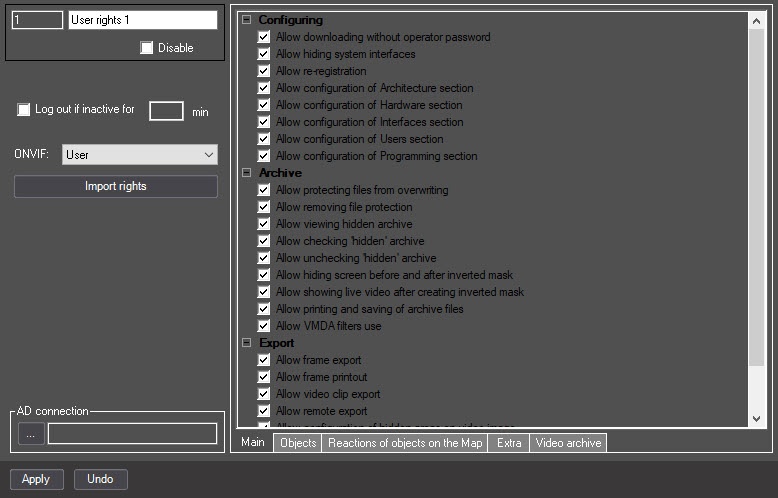
- Click the Apply button.
Configuring rights to work with the ONVIF server is complete.
Overview
Content Tools