
Go to documentation repository

Documentation for Axxon Next 4.5.0 - 4.5.10. Documentation for other versions of Axxon Next is available too.
Previous page Next page

By default, the Сlose-Standing People detection tool triggers when bounding boxes around individuals collide.
You can set another triggering distance by adjusting perspective:
Attention!
For portrait-oriented scenes (such as corridors, warehouse aisles, etc.) perspective adjustment is a must.
- Select a detection tool, and click
 in the preview window.
 Set the size of the same object in different areas of the field of view. To create a calibration length, left-click within the video image in the viewing tile and add two anchor points. Set at least three calibration lengths. You can resize the length by stretching its anchor points
 . You can move it on screen by dragging and dropping.
Attention!
Leveling rods should:
not be located on the same line;
have different height.
Note
For your convenience, you can click the
 button and configure the mask on a still frame / snapshot. To undo, click this button again.
Note
To delete it, click the
 button.
- Enter a triggering distance value (1) in meters into the Distance Sensitivity field. The detection tool will trigger if the current distance becomes equal or less than this value.
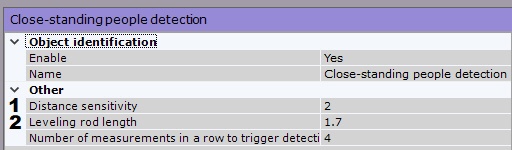
Enter the height (in meters) of the leveling rod into the Leveling Rod Height field (2).
Overview
Content Tools