
Go to documentation repository
Previous page Next page
Note
You can use templates when you create a report.
To add a new template, click Report templates → New template and fill in the Name and Description fields. The template will use the selected parameters of the current report.
Templates work the same way as templates in the scheduler and can be used interchangeably.
When you create a response using a template, click Report templates at the top of the page and select the required template from the list of saved templates (the required template is highlighted). As a result, the parameters of the current report are updated according to the selected template.
The Report by road congestion allows you to get statistical information about traffic congestion.
Note
The Report by road congestion is a part of the IV vehicle detection and Vehicle Processor modules. It is necessary to create and configure the corresponding objects in Auto PSIM (Information-gathering subsystem).
To get statistics on road congestion, do the following:
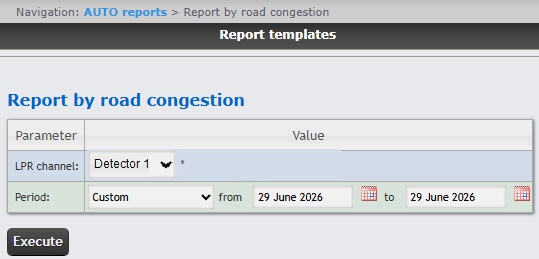
From the Period drop-down list, select the time interval for which the report must be created.
Click the Execute button to create the report. As a result the report in the selected form is displayed
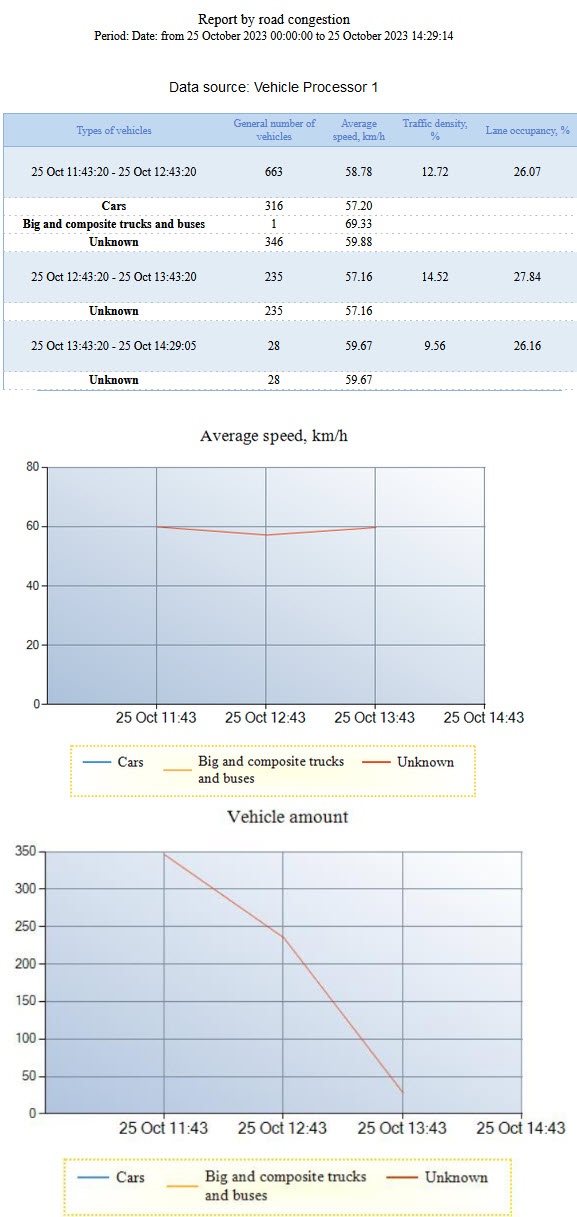
The Data source table contains the following information:
| Column name | Description |
|---|---|
| Types of vehicles | Name of vehicle types that correspond to the configured vehicle type classification on the settings panel of the Vehicle Processor object |
| General number of vehicles | The total number of recorded vehicles of all vehicle types, and separate number of recorded vehicles divided by each vehicle type |
| Average speed, km/h | The total average speed of the vehicle in km/h for all vehicle types, and separate average speed divided by each vehicle type |
| Traffic density, % | Traffic density in percent |
| Lane occupancy, % | Lane occupancy in percent |
The Average speed, km/h graph displays the average speed for each type of vehicle.
The Number of vehicles graph displays the number of vehicles of each type.
You can save the report in the following formats:
Example of the Report by road congestion:
The Report by road congestion is created.

