
Go to documentation repository


To configure the Kaba Exos 9300 parent object, do the following:
- Go to the settings panel of the Kaba Exos 9300 object that is created on the basis of the Computer object on the Hardware tab of the System settings window.
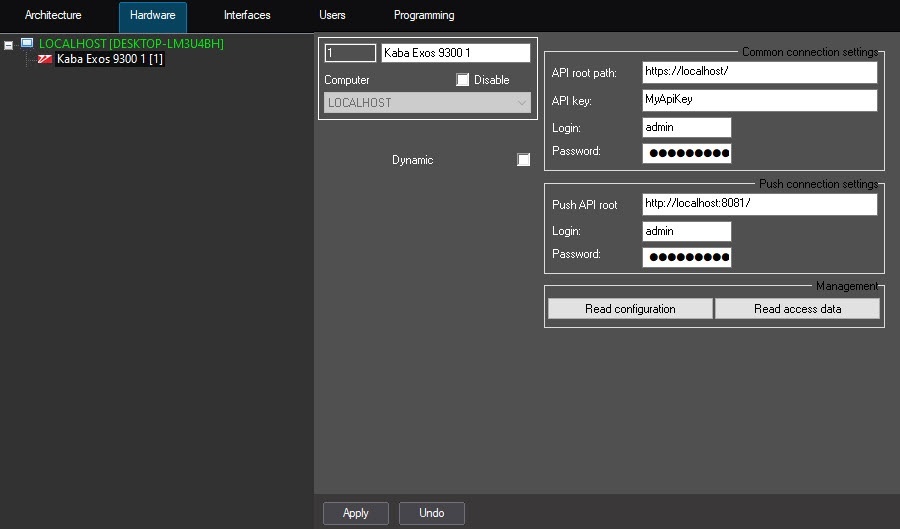
- Enter the common connection settings specified in the manufacturer's software.
- In the API root path field, enter the host name of the Kaba Exos 9300 connection.
- In the API key field, enter the API key of the Kaba Exos 9300.
- In the Login field, enter the username of the Kaba Exos 9300.
- In the Password field, enter the user ID of the Kaba Exos 9300 as the password.
- Enter the push connection settings specified in the manufacturer's software.
- In the Push API root field, enter the host name of the Kaba Exos 9300 push connection containing the connection port number written with a colon.
- In the Login field, enter the username of the Kaba Exos 9300.
- In the Password field, enter the user ID of the Kaba Exos 9300 as the password.
- Click the Apply button to save the connection settings.
- Click the Read configuration button to read the configuration.
A hardware tree will be built: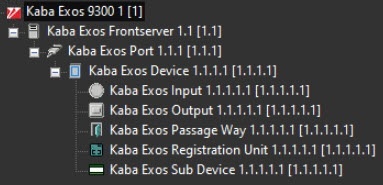
- Click the Read access data button to read the user access data of the Kaba Exos 9300 and save it to the Access Manager.
Configuration of the Kaba Exos 9300 parent object is complete.
Overview
Content Tools