
Go to documentation repository
Documentation for Axxon One 2.0 version. Documentation for Axxon One 3.0 version is also available.

On the page:
General information
The web interface of the self-diagnostics service is available for monitoring the system statuses and analyzing its performance.
Access to the self-diagnostics service
To go to the monitoring interface, do the following:
- Open the web browser.
- In the address line, enter: http://127.0.0.1:20040/.
- Click the Enter button.
Interface and queries execution
The service interface allows viewing metrics as a table or graphs. To run a query, do the following:
Select the metric from the drop-down list 1 or enter the query manually in the Expression field. You can:
- Use several metrics at a time. The system has the following available metrics:
Metric
Description
ALERTS_FOR_STATE
Found and fixed malfunctions. Contains the alertname parameter with the problem type.
ExampleALERTS_FOR_STATE{alertname="ipint_is_not_activated",ep_name="hosts/Server1/DeviceIpint.99",instance="127.0.0.1:20108",job="ngp_exporter",ngp_alert="true"}Decryption of the alertname values (see General information about the self-diagnostics service) for the ALERTS_FOR_STATE metric:
- low_os_memory—out of RAM.
- ipint_is_not_activated—camera is connected, but there is no data from it.
- no_samples_in_detector—no events from the detector.
- restart_services_when_archive_source_not_activated—the archive recording isn't working.
- restart_services_when_no_samples_in_archive—recording to archive with 0 fps.
- restart_services_when_no_ping_from_detector_to_archive—no recording to the archive at the event from the detector.
- logs_disk_space_is_low / db_disk_space_is_low—out of system disk space.
ngp_archive_channel_fps
The frame rate of all cameras when recording to the archive
ngp_archive_volume_size
The current total size of the archive (in bytes)
ngp_cpu_total_usage
The CPU load of the server
ngp_fps
The frame rate of all server cameras, detectors and decoders
ngp_people_count
The last captured number of people in the frame by the Crowd estimation VA detector
ngp_errors
Number of errors in the detectors' operation:
ngp_skipped_pp
Number of missed frames by the Crowd estimation VA detector due to the lack of resources for processing
- Apply logic and arithmetic operators for anomaly searching. The full list of logic and arithmetic operators is specified in the official Prometheus documentation.Example. All metrics where fps is less than 17
ngp_fps < 17
- Faltering by metrics parameters using curly brackets.Example. Fps values only for the specified source
ngp_fps{ep_name=~"hosts/TEST/DeviceIpint.2/SourceEndpoint.video:0:0"}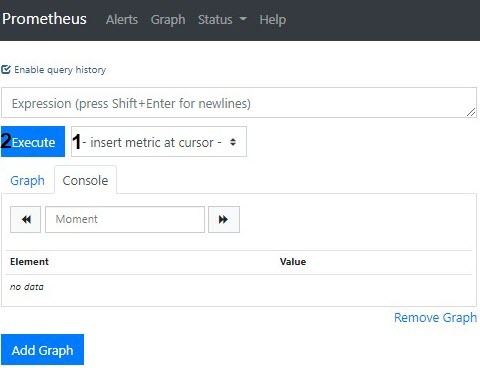
- Use several metrics at a time. The system has the following available metrics:
- If necessary, set the time range for the data.
Click the Execute button.
Viewing results:
- The Console tab displays the current metrics values in the table format.
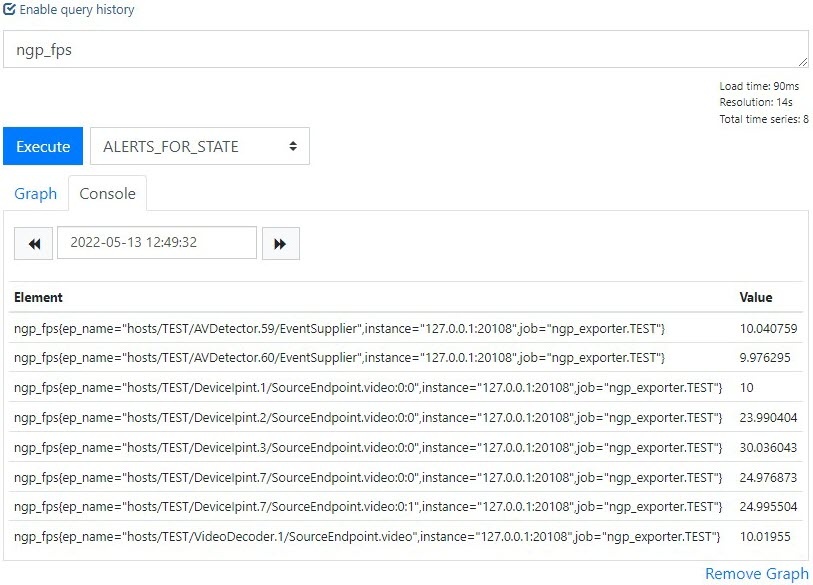
When you specify the date and time in the calendar, the data is updated.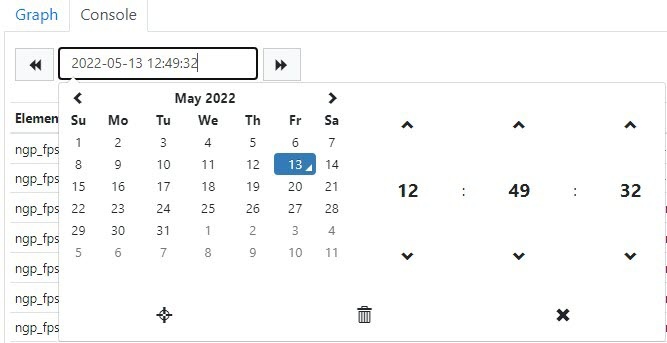
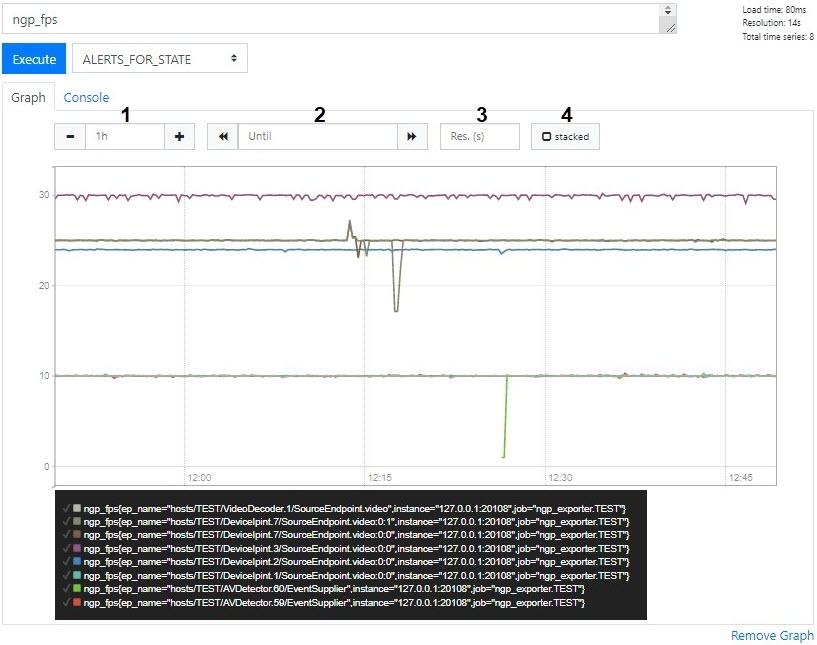
- On the Graph tab you can create the graph of selected metrics at the specified period.
- The 1 field—sets the graph time interval.
- The 2 field—specifies the end graph point.
- The 3 field—sets the interval between data points.
- The 4 checkbox—enables the display mode with accumulation (filling the areas under the graph).
Examples of useful queries for Windows OS
- The CPU loading graph (analog of the System monitor):
sum by (process_id) (100 / scalar(wmi_cs_logical_processors) * (irate(wmi_process_cpu_time_total{process="AppHost"}[10m]))) or ngp_cpu_total_usage - RAM usage by the AppHost processes and a total memory space:
sum by (process_id) (avg_over_time(wmi_process_working_set{process="AppHost"}[5m])) / 1024 or avg_over_time(wmi_os_virtual_memory_bytes[5m]) / 1024 - The percentage of RAM usage:
100.0 - 100 * avg_over_time(wmi_os_virtual_memory_free_bytes[5m]) / avg_over_time(wmi_os_virtual_memory_bytes[5m])
Examples of useful queries for Linux OS
- The total RAM usage by the AppHost processes:
sum by (groupname) (namedprocess_namegroup_memory_bytes{memtype="resident"}) - The percentage of RAM usage:
100 - node_memory_MemAvailable_bytes * 100 / node_memory_MemTotal_bytes
- The CPU load by the AppHost processes as a percentage:
sum by (object_id) (rate(namedprocess_namegroup_cpu_seconds_total{groupname="AppHost"}[1m])) * 100 - The total CPU load as a percentage:
100 * avg without (cpu) (1 - rate(node_cpu_seconds_total{mode="idle"}[1m])) - RAM usage by the AppHost processes to detect the memory leak:
namedprocess_namegroup_memory_bytes{object_id=~"APP_HOST.*",memtype="proportionalResident"}
Overview
Content Tools