
Go to documentation repository

Documentation for Monitoring PSIM 2.0 (english)
Previous page Next page

The settings panel of the Agent Of Control object is given in the figure.
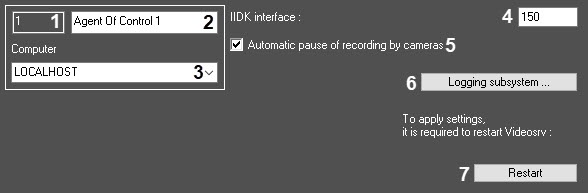
The description of the Agent Of Control object settings panel elements is given in the table.
№ | Parameter | Method for setting the parameter value | Description | Type | Default value | Value range |
|---|---|---|---|---|---|---|
1 | The Identifier field* | Automatically | Displays the identification number of the Agent Of Control object in the system | Sequence of numbers | NA | >=0 |
2 | The Name field* | Enter the value in the field | Sets the name of the Agent Of Control object in the system | Latin alphabet, Cyrillic, and service characters | Agent Of Control | A line containing a sequence of any characters (letters, digits, service characters except > and < characters), case-insensitive. Number of characters—from 1 to 60 |
3 | The Computer drop-down list | Select the value from the list | Sets the name of the Computer parent object for the given Agent Of Control object | Name of the Computer objects registered in the system | Name of the Computer parent object | Depends on the number of the Computer objects in the system |
4 | The IIDK interface field | Enter the value in the field | Sets the number of the IIDK interface object used by the Agent Of Control | Sequence of numbers | 150 | >=0 |
5 | The Automatic pause of recording by cameras checkbox | Set the checkbox | Specifies the mode of script execution to receive video frames and video clips from the archive. With the set checkbox, the code scripts are executed automatically. To configure them, use the SleepAfterDisarm and SleepAfterRecStop parameters of the HKEY_LOCAL_MACHINE\SOFTWARE\Wow6432Node\BitSoft\VHOST\VHostService registry key (see Vertical solutions). If you clear the checkbox, the code scripts aren't executed automatically. In this case, you can use scripts described here | Boolean type | Set | Set—code scripts are executed automatically Clear—code scripts aren't executed automatically For more details, refer to the Setting configurations for transferred video data page |
6 | The Logging subsystem... button | Click the button | Opens the file log parameters settings window | NA | NA | NA |
7 | The Restart button | Click the button | Restarts the VideoSrv communication module | NA | NA | NA |
*Name of the element isn't displayed in the settings panel of the given object
Overview
Content Tools