
Go to documentation repository

Documentation for Axxon PSIM 2.0. Documentation for other versions of Axxon PSIM is available too.
Previous page Next page

The Backup archive panel interface object is designed for configuring the backup archive panel, which is used for starting and monitoring the status of the backup archiving process, as well as changing the parameters of the backup archiving.
To configure the main parameters of the Backup archive panel interface object, do the following:
- Go to the Interfaces tab in the System settings dialog window (1).
- Select the Backup archive panel object in the objects tree on the Interfaces tab (2). The settings panel for this object is displayed on the right of the Interfaces tab.
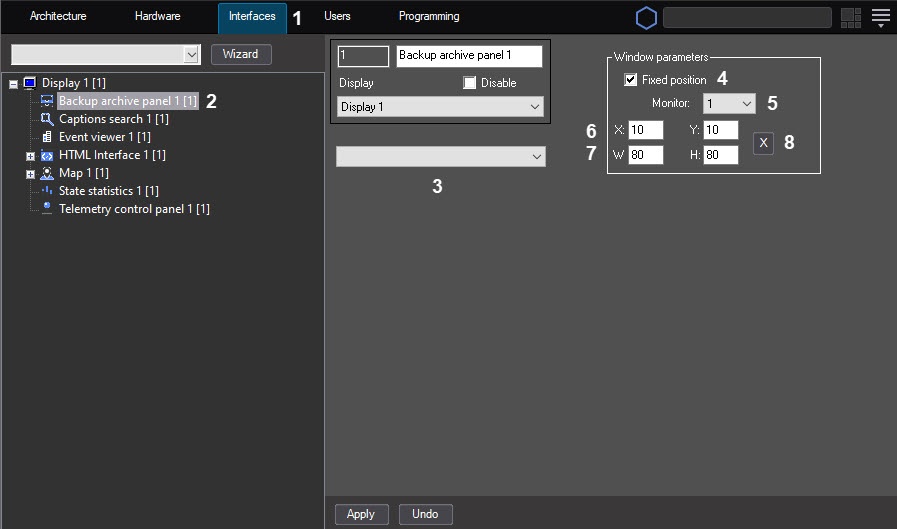
- Select the Backup archive object (3) from the drop-down list for which this panel is created.
- From the Monitor drop-down list (5), select the number of the computer monitor in the operating system on which you want to display the interface window.
- Set the Fixed position checkbox (4) if you want to specify the accurate values of the Backup archive panel window position on the screen.
As a result, the X, Y, W, H fields and the button become available for editing and specifying the position via the test window.
 - Set the position of the Backup archive panel interface window in one of the following ways:
- Manually:
- Specify the coordinates of the backup archive panel position on the screen. To do this, change the values in the X and Y fields (6).
The values of the X and Y fields correspond to the coordinates of the upper left corner of the backup archive panel position on the screen and are expressed as percentages relative to the screen size horizontally and vertically. - Specify the width and height of the Backup archive panel window displayed on the screen. To do this, change the values in the W and H fields (7).
The values of the W and H fields are expressed as percentages relative to the screen size horizontally and vertically.
- Specify the coordinates of the backup archive panel position on the screen. To do this, change the values in the X and Y fields (6).
- Using the test window:
- Click the button (8).
- Place the Specify dimensions opened test window where the Backup archive panel window must be displayed:
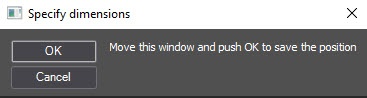
- Click the OK button.
As a result, the coordinates in the X, Y, W, H fields are set in accordance with the size and position of the test window.
- Click the
- Manually:
- Click the Apply button.
Configuring the Backup archive panel interface object is complete.
Overview
Content Tools