Unable to render embedded object: File (books.jpg) not found.
Go to documentation repository

Page History
To configure switching to a PTZ camera preset, you must perform the following steps:
- Select the Go to preset check box (1Add the Rule name rule (see Adding an automatic rule).
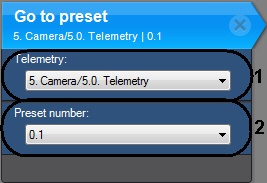
- In the PTZ Telemetry list (21) select a Telemetry object that matches the PTZ device of the PTZ video camera. The pan/tilt unit of any PTZ camera can be used, including one tied to another server (if it is enabled).
- In the Preset number list (32), select the number of the camera preset to which the camera should switch when the detection tool is triggered.
- Go to another automatic rule, or click ApplyTo save changes, click the Apply button.
Configuration of switching to a PTZ camera preset is now complete.
Overview
Content Tools