
Go to documentation repository


Page History
Software The workability software control of workability allows restarting the a module or Intellect the Axxon PSIM core if there is no response from the this module.
To configure the software control of workability, do the following:
- Go to the settings panel for the System restart service
- service object.
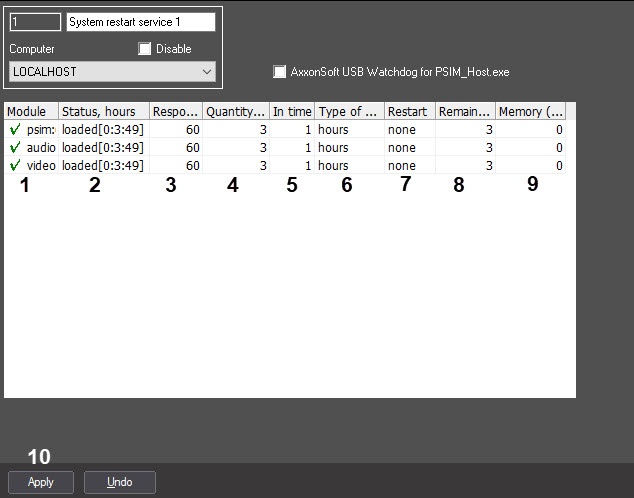
- The list of run
- modules running on this computer is automatically displayed automatically
- in the Module column (1).
Info title Note . Modules
with the whose state is determined as In process
state are marked with
the
 sign. Modules whose state is determined as No response (red field) or Shutdown are marked with the ! sign
.
- The current state of modules is automatically displayed in the Status, hours column (2). In the
- The square brackets display the time of
- module working time since the last restart is displayed
- in the HH:MM:SS format.
- In the Response timeout, sec field, type-in
- enter the time period in seconds during which the response from the module will be waited
- is awaited (3).
Info title Note .You can restart the system if there is no response from the module
within after the waiting interval.
- In the Quantity of restart
- restarts field , type-in
- (4), enter the maximum number of restarts (module or Intellect
- the Axxon PSIM core) that can be performed within the specified time
- period (4)
- .
- In the In time field , type-in
- (5), enter the new numerical value and/or select in the Time unit dropdown list
- from the Type of period drop-down list (6) the required metric unit of period if you want to change the value of the time period during which the maximum number of restarts can be performed (5-6)
- . In
- From the Restart dropdown list
- drop-down list (7), select the required method
- way of restart (7)
- .
- Select the module
method, - option if you want to restart the module without a response.
- Select the
core method, to restart the Intellect core without - core option if you want to restart the Axxon PSIM core when there is no response from the module.
Info title Note
. Select the None value if the restart is not needed In case you don't want to restart the system when there is no response from the module, select the none value.
- The remaining number of restarts within
- during the specified
- current time period is automatically displayed in the Remains of restarts column (8).
-
Info title Note . The module
changes over switches to
the the Shutdown state if the number of performed restarts exceeds the maximum one during the current time period.
Info title Note . The
remaining reboots counter may be counter of the remaining restarts can reset in the following
circumstancescases:
a. If the period of time in 1. The counter is reset upon the new restart if the time period during which the maximum number of
reboots restarts can be performed
has elapsed but expires and the number of
reboots performed does not performed restarts doesn't exceed the maximum
, then one.
2. The module restarts and the counter
will be reset upon a new reboot. is reset if the time period during which the maximum number of
reboots restarts can be performed
has elapsed expires and the maximum number of
reboots has been performed, then the module will reboot and the counter will be resetrestarts is performed.
- In the
- the Memory (Mb) field (9), enter the value of the memory threshold consumed by module. Exceeding of this value requires the system restart (9)
- the module, exceeding which, you must restart the system.
- To save changes, click the
- the Apply button (10).
 sign. Modules with the No response state
 b. If the period of time in which the
...
- Configuring the software control of workability is complete.
Configuring the software control of workability is
...
complete.
Overview
Content Tools