
Go to documentation repository
In order to To register a new role in Intellect Web the WEB Report System do the followingPSIM:
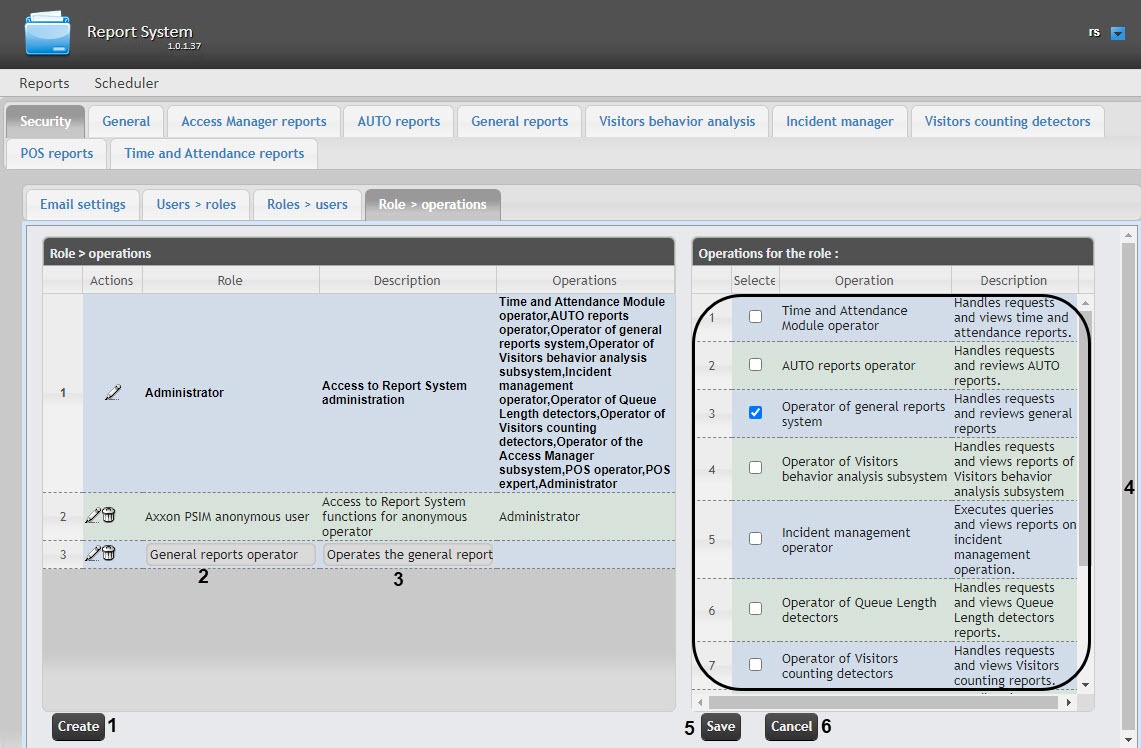
As a result, a new line
is added to the Role
> operations table. Fill in its fields:
In the Description field
, enter a brief description of the operations that will be available to the users with a new role (3).
| Info | ||
|---|---|---|
|
This field is optional for filling in |
. |
In the Operations for the role table (4) in the Selected column, set the checkboxes
next to those operations that
are available for users with a new role.
| Info | ||
|---|---|---|
|
We recommend you study the description of operations beforehand in the Description column of the same table. |
In order to register a role, click the Save button (5).
| Info | ||
|---|---|---|
|
...
...
To cancel the registration of a new role, click the Cancel button (6). |
Role registration in Intellect Web the WEB Report System PSIM is completedcomplete.

