
Go to documentation repository


Page History
The To configure the network settings of the Axxon PSIM's SIP client are set in the SIP client, do the following order:
- Go to the settings panel of the the SIP-terminal object object.
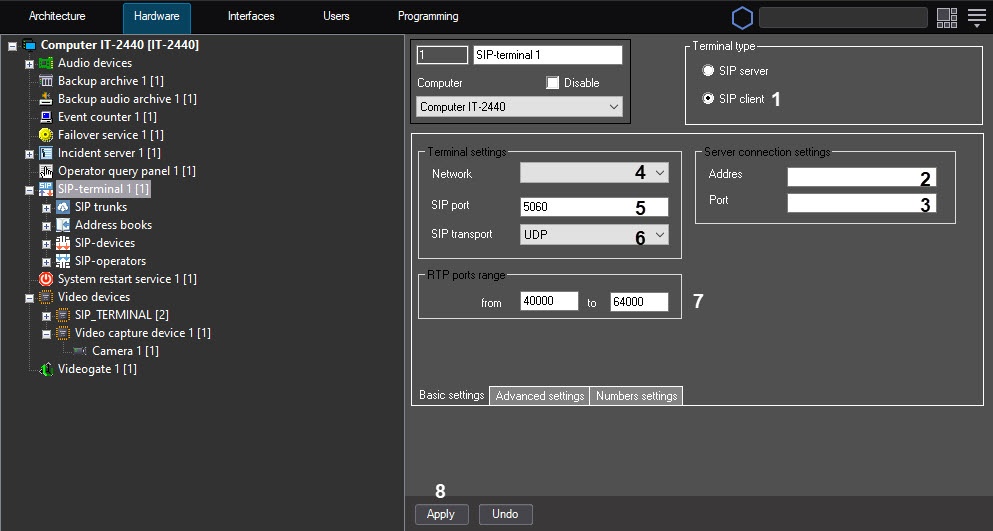
- Set the Terminal type switch to the SIP client position (1) — the SIP-terminal acts as a client , it and can be connected connect to any SIP-server (based on the on Axxon PSIM or the Asterisk software). If When you select this terminal type is selected, the Server connection settings become editableavailable.
- In the Server connection settings group:
- In the Address field (2), specify the IP address of the SIP server.
- In the Port field (3),
specify - specify the port
for - to connect to the SIP
server connection- server.
- In the Terminal settings group:
- From the Network drop-down list (4), select the IP address of the network adapter that will be is used to connect to the network where the SIP clients are located.
- In the SIP port field (5), specify the port number which will receive that receives the data from clients via the SIP -clientsprotocol.
- From the SIP transport drop-down list (6), select the used transport level protocol to be used: TCP or UDP.
- If necessary, specify set the RTP ports port range in the corresponding text fields (7).
- Click the Apply button (8).
The Configuring the network settings of the Axxon PSIM's SIP client are setthe SIP client is complete.
Overview
Content Tools