
Go to documentation repository


Page History
...
| Section | |||||||||||||||||||||
|---|---|---|---|---|---|---|---|---|---|---|---|---|---|---|---|---|---|---|---|---|---|
|
Error starting NGP Host Service
If port 20111 is busy during installation of Axxon One (for example, because of nethost.exe processes that have not been unloaded since removal of the previous version), an error message regarding the launch of NGP Host Service appears.
To continue installation, free up port 20111 and try again.
Error connecting to the Postgres Database
After installation of the Postgres database, the Axxon One installer may quit prematurely. This situation may be associated with the inability of the installer to connect to the Postgres database, if the firewall is enabled. To prevent this, disable your firewall during installation.
| Info | ||
|---|---|---|
| ||
Disabling the firewall during installation can cause another problem—see No signal from video cameras and failure to connect to other servers. |
| Anchor | ||||
|---|---|---|---|---|
|
...
This can be solved by installing the Windows update KB2999226.
Error connecting to the Postgres Database
After installation of the Postgres database, the Axxon One installer may quit prematurely. This situation may be associated with the inability of the installer to connect to the Postgres database if the firewall is enabled. To prevent this, disable your firewall during installation.
| Info | ||
|---|---|---|
| ||
Disabling the firewall during installation can cause another problem (see Camera). |
Error when installing on Windows OS 11 with the enabled Smart App Control
An error can occur when you install and work with Smart App Control at the same time. To fix it, we recommend doing the following:
- Disable Smart App Control before the installation.
- Add AxxonOne.exe to the list of trusted applications in Smart App Control.
- Use grouppoliciesorenterprisesecurityconfigurations in the corporateenvironment to manage the Smart App Control settings.
Window 10 OS installation error
When you install Axxon One on Windows 10Windows 10.0.17763 and up, you may see the Create Recovery Archive error message.
...
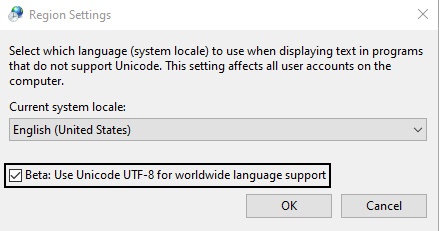
- Go to Control Panel → Clock and Region → Region → Administrative tab → Change System Locale.
- Deselect the checkbox Beta: Use Unicode UTF-8 for worldwide language support.
- Reinstall Axxon One.
Server error on Windows 11 OS and Windows Server 2019 OS
...
- .
For the correct installation of Guardant drivers, it is necessary to disable the check of the drivers digital signature in the operating system and disable Secure Boot in BIOS.
Guardant drivers compatibility issue
When you install Axxon One, a Guardant driver compatibility issue may occur (grdkey.sys or grdusb.sys file error).
To fix the error, do as follows:
- Disable Memory integrity:
- Open Windows Security Center → Device security.
- In the Core isolation section, click the Core isolation information link.
- Set the Memory integrity switch to the inactive position.
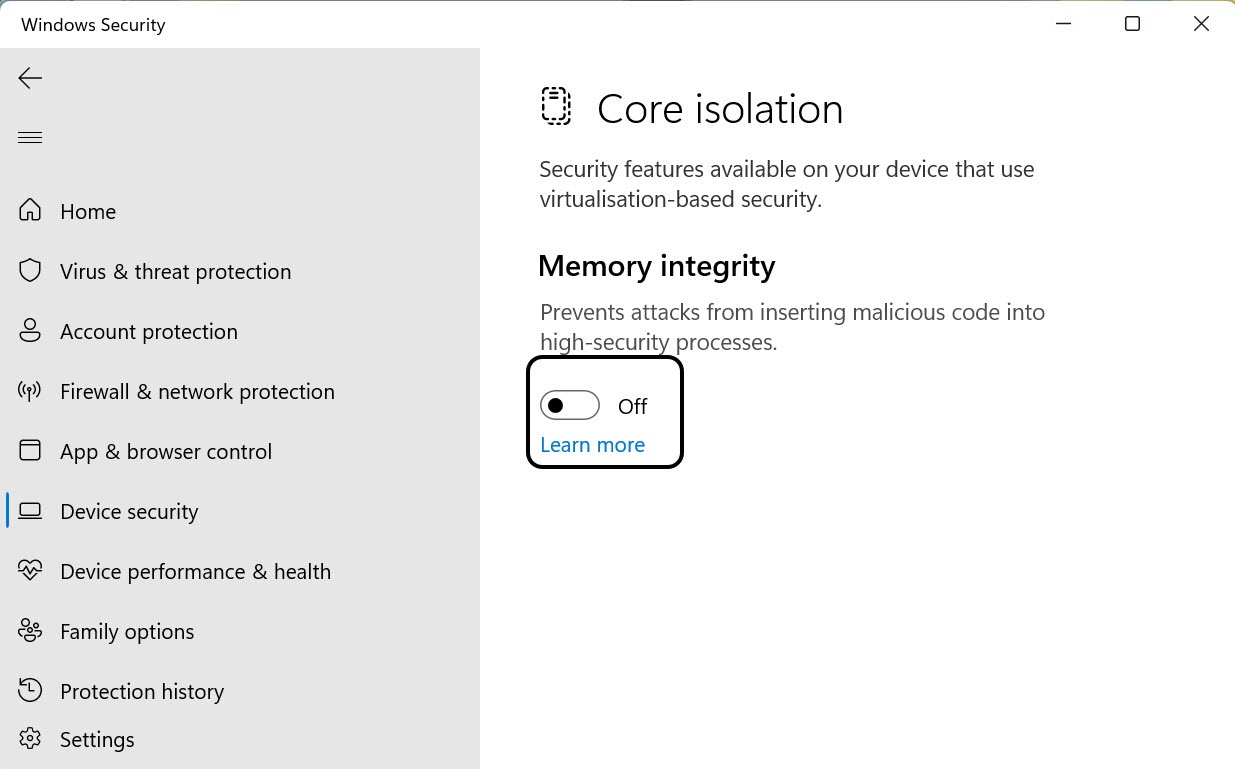
- After you complete these steps, restart your computer to apply the changes.
- Disable Device Guard:
- Using the command line, run the gpedit.msc command to launch the Local Group Policy Editor.
- Go to Computer Configuration → Administrative Templates → System → Device Guard → select Enable virtualization-based security on the right.
- After you disable these options, restart your computer and reinstall the current version of Guardant drivers.
| Note | ||
|---|---|---|
| ||
If you use modern Guardant keys (Sign/Sign Net/Time/Code), you can contact the developer of the protected application and request to switch the key to driverless mode (see the official Guardant documentation). In this case, it will not be necessary to install the Guardant Driver on your computer to work with the key. |
An error occurred when installing on Windows with the language pack Norsk (bokmål)
Installing the Axxon One Server on Windows with the language pack Norsk (bokmål) is not possible due to incompatibility with PostgreSQL.
You must install the Norsk Language Pack (nynorsk).
Error uninstalling Axxon One on systems with Videoinspector installed
In some cases, uninstalling Axxon One may be impossible if Videoinspector is used.
Usage of N or KN editions of Windows OS
Axxon One is not guaranteed to work on Windows N or KN editions. For correct operation, you must install the Media Feature PackTo correctly uninstall Axxon One, first uninstall Videoinspector.
Overview
Content Tools