
Go to documentation repository


Page History
To configure the Face detection 얼굴 감지(VL), do the following:를 구성하려면 다음 단계를 따르세요.
- 얼굴 감지 Select the Face detection (VL) object 객체를 선택합니다.
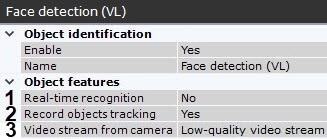
- If you need to use this detection tool for real-time face recognition, set the corresponding parameter to Yes (1, see 실시간 얼굴 검출 구성).
- If you need to record metadata, select Yes from the Record objects tracking list (2).
- If the camera supports multistreaming, select the stream for which detection is needed (3). For the correct operation of the Face detection (VL), it is recommended to use a High-quality video stream.
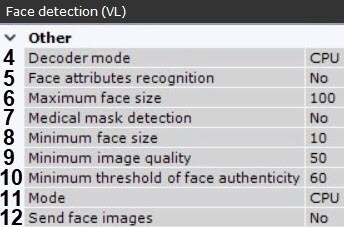
- Select a processing resource for decoding video streams (4). When you select a GPU, a stand-alone graphics card takes priority (when decoding with NVIDIA NVDEC chips). If there is no appropriate GPU, the decoding will use the Intel Quick Sync Video technology. Otherwise, CPU resources will be used for decoding.
- In the Face attributes recognition field (5), select Yes if it is necessary to recognize gender and age.
- Set the maximum size of the captured faces as a percentage of the frame size (6).
- If necessary, set Yes for the Medical mask detection parameter (7, see Configuring masks detection).
- Set the minimum size of the captured faces as a percentage of the frame size (8).
- Set the Minimum image quality of a person's face for face detection (9). A required value should be selected empirically, at least 50 is recommended.
- In the Minimum threshold of face authenticity field (10), set the minimum level of face recognition accuracy for the creation of a track. A required value should be selected empirically, at least 90 is recommended. The higher the value, the higher the recognition quality will be.
- 실시간 얼굴 인식을 위해 이 검출 도구를 사용해야 하는 경우, 해당 매개변수를 예로 설정합니다(1, 실시간 얼굴 감지 구성 참조).
- 메타데이터를 기록해야 하는 경우, 객체 추적 기록 목록에서 예를 선택합니다 (2).
- 카메라가 다중 스트리밍을 지원하는 경우, 감지가 필요한 스트림을 선택합니다 (3). 얼굴 감지(VL)가 제대로 작동하려면 고화질 비디오 스트림을 사용하는 것이 권장됩니다.
- 비디오 스트림 디코딩을 위한 처리 자원을 선택합니다 (4). GPU를 선택하면, 독립형 그래픽 카드가 우선 사용됩니다 (NVIDIA NVDEC 칩을 사용할 때). 적합한 GPU가 없으면 디코딩은 Intel Quick Sync Video 기술을 사용하고 그 외의 경우에는 CPU 자원을 사용하여 디코딩이 진행됩니다.
- 얼굴 속성 인식 필드에서 성별과 나이를 인식해야 하는 경우, 예를 선택합니다 (5).
- 캡처된 얼굴의 최대 크기를 프레임 크기의 백분율로 설정합니다 (6).
- 필요한 경우, 의료 마스크 감지 매개변수를 예로 설정합니다 (7, Configuring masks detection 참조).
- 캡처된 얼굴의 최소 크기를 프레임 크기의 백분율로 설정합니다 (8).
- 얼굴 감지를 위한 최소 이미지 품질을 설정합니다 (9). 요구되는 값은 경험적으로 선택해야 하며 최소 50 이상의 값을 권장합니다.
- 얼굴 진위성 최소 임계값 필드(10)에서 추적 생성을 위한 얼굴 인식 정확도의 최소 수준을 설정합니다. 요구되는 값은 경험적으로 선택해야 하며 최소 90 이상의 값을 권장합니다. 값이 높을수록 인식 품질이 향상됩니다.
얼굴 감지를 위한 프로세서를 선택합니다 − CPU 또는 NVIDIA GPU (11, General Information on Configuring Detection 참조Select the processor for the face detection − CPU or NVIDIA GPU (11, see General Information on Configuring Detection).
Note title Attention! It may take several minutes to launch the algorithm on an NVIDIA GPU after you apply the settings.
설정을 적용한 후, NVIDIA GPU에서 알고리즘을 실행하는 데 몇 분 정도 걸릴 수 있습니다.
- FaceCube 통합을 사용하는 경우 (FaceCube 통합 구성 참조), 얼굴 이미지 전송 매개변수를 활성화합니다 If FaceCube integration is used (see FaceCube 통합 구성), enable the Send face images parameter (12).
- If necessary, fine-tune the detection tool (see 얼굴 검출 필요한 경우, 검출 도구 미세 조정을 진행합니다 (얼굴 감지 (VL) 미세 조정 참조).
- In the preview window, set the rectangular area of the frame where faces should be detected. To select the area, move the anchor points
 미리보기 창에서 얼굴을 감지할 프레임의 직사각형 영역을 설정합니다. 영역을 선택하려면 앵커포인트 를 이동합니다.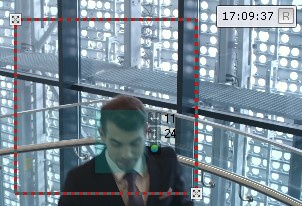
- Click the Apply button.
- 적용 버튼을 클릭합니다.
이제 얼굴 감지The Face detection (VL) is now configured가 구성되었습니다.
Overview
Content Tools