
Documentation for Axxonsoft Platform Calculator. Documentation for other products available here.
Previous page Next page

The platform calculator allows setting maximum CPU load. On the basis of this parameter the number of Servers is calculated.
To set maximum CPU load, do the following:
- Click the Settings button on the Platform Calculator page.

- The box for setting calculator parameters is displayed.
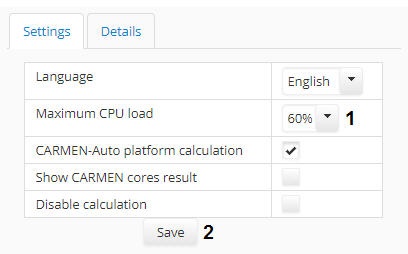
- Select the required value of maximum CPU load in the Maximum CPU load dropdown list.
- Click the Save button. The changes will be saved and the box will be closed.
The maximum CPU load is now configured.
Overview
Content Tools