
Go to documentation repository

Previous page Next page

Setting up the TREZOR-BL output board is performed in the following way:
- Go to the BL Output (Trezor) object settings created on the basis of the BL (Trezor).
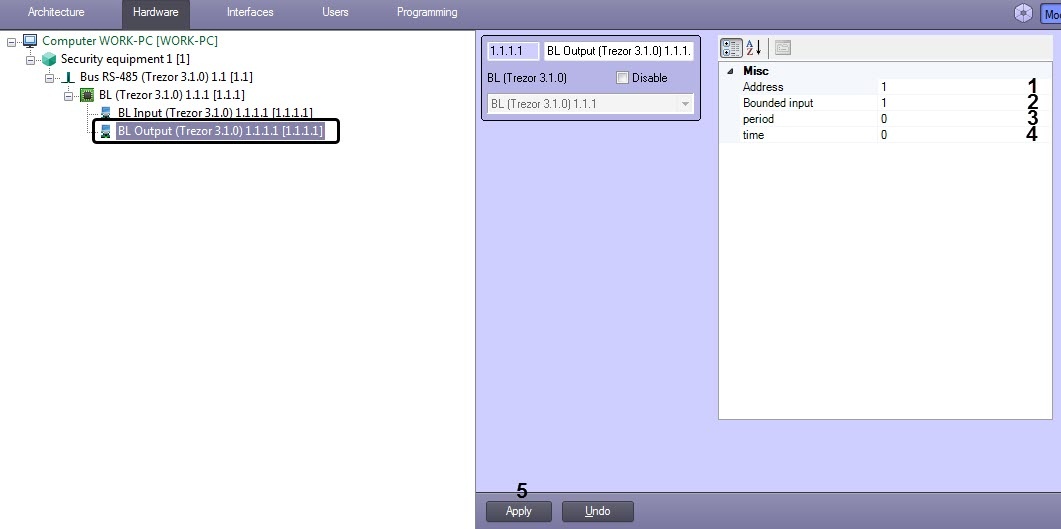
- For the Address parameter (1), specify the input number (from 1 to 4).
- For the Bounded input parameter (2), specify the number of the input board to which the output board will be linked (from 1 to 4).
For the period (3) and time (4) parameters, specify the values in accordance with the table below:
Output board operating mode time parameter period parameter Note Single switch 0 s 0 s In case of alarm on the input board, the relay switches the contacts from the “C-NC” position to the “C-NO” position. To return to the initial state, use the “Switch” button or the Switch relay command (see Operating the TREZOR-BL output board) Single switch for a time period 0...300 s 0 s Switching the relay once to the opposite state for the time period specified in the time parameter and returning to the initial state.
Repeated switch for a time period 0...300 s 0...120 s Repeated switching of the relay to the opposite state during the time specified in the time parameter with intervals equal to the value of the period parameter. - Click Apply (5).
The TREZOR-BL output board is configured.
Overview
Content Tools