
Go to documentation repository

Documentation for Axxon PSIM 2.0. Documentation for other versions of Axxon PSIM is available too.
Previous page Next page

Example 1. Visualization of operation of the Queue length detection in the Video surveillance monitor
For the script to work correctly in Axxon PSIM, you must first create and configure the Queue length detection object (part of the Detector Pack package), Camera, and Captioner objects (below, instead of the N, M, and L characters, set the corresponding numbers of the Queue length detection, Camera, and Captioner objects).
//Event reading by the queue length
if (Event.SourceType == "OCCUPANCY_COUNTER" && Event.SourceId == "N" && Event.Action == "OCCUPANCY")  //N - Number of Queue length detection
{
  var n=Event.GetParam("occupancy");
//Display of the queue length by the Captioner in the Monitor
  DoReactStr("CAM","M","CLEAR_SUBTITLES","title_id<L>"); //M - Number of Camera  L - Number of Captioner
  DoReactStr("CAM","M","ADD_SUBTITLES","command<Queue length: "+n+" person(s).\r>,page<BEGIN>,title_id<L>"); //M, L - the same
}
As a result, when the corresponding camera is displayed on the monitor, a text message about the current queue length is superimposed on the video.
You can configure the font, color, and position of text on the settings panel of the Captioner object.
Note
When you use the page<BEGIN> and page<END> parameters, the corresponding fields of the captions database are filled in. This enables data search using the Captions search interface object.
Example 2. Visualization of operation of the People counter detection in the Video surveillance monitor
For the script to work correctly in Axxon PSIM, you must first create and configure the People counter detection object (part of the Detector Pack package), Camera, Captioner, and Macro objects (below, instead of the N, M, L, P characters, set the corresponding numbers of the People counter detection, Camera, Captioner, and Macro objects).
//Event reading and counting of entered people
if (Event.SourceType == "PEOPLE_COUNTER" && Event.SourceId == "N" && Event.Action == "IN") //N - Number of People counter detection
  {
    i = Itv_var("counter_i");
    k = Itv_var("counter_k");
    i++;
    Itv_var("counter_i")=i;
//Display of the number of people by the Captioner in the Monitor

    DoReactStr("CAM","M","CLEAR_SUBTITLES","title_id<L>"); //M - Number of Camera  L - Number of Captioner
    DoReactStr("CAM","M","ADD_SUBTITLES","command<Number of people (entering/exiting): "+i+" / "+k+"\r>,page<BEGIN>,title_id<L>"); //M, L - the same

  }
//Event reading and counting of exiting people
if (Event.SourceType == "PEOPLE_COUNTER" && Event.SourceId == "N" && Event.Action == "OUT") //N - Number of People Counter detection
  {
    i = Itv_var("counter_i");
    k = Itv_var("counter_k");
    k++;
    Itv_var("counter_k")=k;
//Display of the number of people by the Captioner in the Monitor

   DoReactStr("CAM","M","CLEAR_SUBTITLES","title_id<L>"); //M - Number of Camera  L - Number of Captioner
   DoReactStr("CAM","M","ADD_SUBTITLES","command<Number of people (entering/exiting): "+i+" / "+k+"\r>,page<BEGIN>,title_id<L>"); //M, L - the same
  }
//Null the counter on Macro (the Macro must be created in Axxon PSIM beforehand)
if (Event.SourceType == "MACRO" && Event.SourceId == "P" && Event.Action == "RUN") //P - Number of Macro
  {
    Itv_var("counter_i")=0;
    Itv_var("counter_k")=0;
    i=0;
    k=0;
//Display of the number of people by the Captioner in the Monitor

    DoReactStr("CAM","M","CLEAR_SUBTITLES","title_id<L>"); //M - Number of Camera  L - Number of Captioner
    DoReactStr("CAM","M","ADD_SUBTITLES","command<Number of people (entering/exiting): "+i+" / "+k+"\r>,page<BEGIN>,title_id<L>"); //M, L - the same
  }
As a result, when the corresponding camera is displayed on the monitor, a text message about the number of entered and exited people is superimposed on the video.
Note
When you use the page<BEGIN> and page<END> parameters, the corresponding fields of the captions database are filled in. This enables data search using the Captions search interface object.
You can configure the font, color, and position of text on the settings panel of the Captioner object (see Caption display on top of video image).
To null the people counter, you must first create the Macro object on the Programming tab. You can change the name of the Macro object, for example, "Null people counter".
You can run the macro to null the people counter either manually from the main menu of Axxon PSIM or automatically at any specified time (for this, use the Events table on the settings panel of the Macro object, on which you must specify the previously configured Time schedule object). For more information about the use of the Macro and Time schedule objects, see Administrator's Guide.
Example 3. Show camera on the monitor after clicking the button on the control panel
The following example is valid only for cameras in a configuration in which there is a PTZ control panel. When you configure Video surveillance monitor, select the Go to preset action with 1,2,3...,0 parameters for ten joystick buttons (see Assigning commands to joystick buttons using the Monitor section of Guide for installing and configuring security system components).
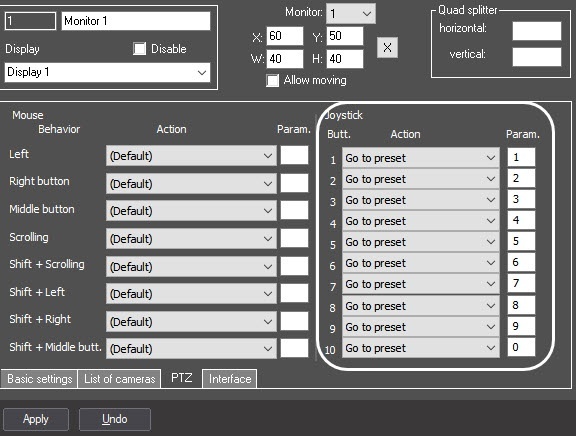
Example. When the button is clicked on the control panel, display the corresponding camera on the active Monitor. The script must be triggered by a timer with ID=1.
Note
You must create and configure the Timer object beforehand and set the current year. For detailed information on configuring the Timer object, see Creating and configuring the Timer object.
After each button click on the control panel, wait for two seconds until clicking another button. If there is no button click, then the camera with a dialed number must be displayed.
if (Event.SourceType=="TIMER" && Event.SourceId=="1" && Event.Action=="TRIGGER")
{
  mon="1";
  DebugLogString("on monitor "+ Itv_var("cam"));
  DoReactStr("MONITOR",mon,"ACTIVATE_CAM","cam<"+Itv_var("cam")+">");
  Itv_var("cam")="";
}

if (Event.GetParam("source_type")=="TELEMETRY" && Event.GetParam("action")=="GO_PRESET")
{
  DoReactStr("TIMER","1","START","bound<2>");
  var key=Event.GetParam("param4_val");
  DebugLogString("Key:"+key);
  Itv_var("cam")=Itv_var("cam")+key;
  DebugLogString(Itv_var("cam"));
}
Example 4. Superimposing captions
On Macro 1, display the text
"NNN
Titles"
(with line break) over the video of camera 1 using captioner 1. On Macro 2, disable the display of this text.
if (Event.SourceType == "MACRO" && Event.SourceId == "1" && Event.Action == "RUN")
{
    DoReactStr("MONITOR","1","SET_TITLES","titles<NNN \r Titles>,cam<1>,title_id<1>");
}

if (Event.SourceType == "MACRO" && Event.SourceId == "2" && Event.Action == "RUN")
{
DoReactStr("MONITOR","1","CLEAR_TITLES","cam<1>,title_id<1>");
}
Example 5. Show a camera with a stream of the selected type in the Video surveillance monitor
On macro, display a camera with a stream of the selected type or with the required stream ID on Monitor 2.
if (Event.SourceType == "MACRO" && Event.SourceId == "1" && Event.Action == "RUN") //by stream type
{
    DoReactStr("MONITOR","2","REMOVE","cam<5>");
    DoReactStr("MONITOR","2","ADD_SHOW","cam<5>,stream_id<stream_client_flag>");
}

if (Event.SourceType == "MACRO" && Event.SourceId == "2" && Event.Action == "RUN") //by stream type
{
    DoReactStr("MONITOR","2","REMOVE","cam<5>");
    DoReactStr("MONITOR","2","ADD_SHOW","cam<5>,stream_id<stream_analytics_flag>");
}

if (Event.SourceType == "MACRO" && Event.SourceId == "3" && Event.Action == "RUN") //by stream type
{
    DoReactStr("MONITOR","2","REMOVE","cam<5>");
    DoReactStr("MONITOR","2","ADD_SHOW","cam<5>,stream_id<stream_archive_flag>");
}

if (Event.SourceType == "MACRO" && Event.SourceId == "4" && Event.Action == "RUN") //by stream type
{
    DoReactStr("MONITOR","2","REMOVE","cam<5>");
    DoReactStr("MONITOR","2","ADD_SHOW","cam<5>,stream_id<stream_alarm_flag>");
}

if (Event.SourceType == "MACRO" && Event.SourceId == "5" && Event.Action == "RUN") //by stream ID
{
    DoReactStr("MONITOR","2","REMOVE","cam<5>");
    DoReactStr("MONITOR","2","ADD_SHOW","cam<5>,stream_id<5.1>");
}
Example 6. Start and stop the layout scrolling in the Video surveillance monitor
On macro 1, enable layout scrolling on all servers in the Video surveillance monitor (Monitor 1). On macro 2, disable layout scrolling on all servers.
if(Event.SourceType == "MACRO" && Event.SourceId=="1" && Event.Action=="RUN")
{
    DoReactStr("MONITOR", "1","START_PAGING_LAYOUTS","");
}

if (Event.SourceType == "MACRO" && Event.SourceId == "2" && Event.Action == "RUN")
{
    DoReactStr("MONITOR", "1", "STOP_PAGING_LAYOUTS","");
}
Example 7. Change the position of camera 1 in the Video surveillance monitor
Change the position of fisheye camera 1 in the Video surveillance monitor (Monitor 1) to the position specified in the script.
if (Event.SourceType == "MACRO" && Event.SourceId == "1" && Event.Action == "RUN")
{
	react = CreateMsg();
	react.StringToMsg("MONITOR|1|CAM_PARAMS|dewarp_display<0>,cam<1>,dewarp_zoom<1.600000,date<22-01-24>,dewarp_y<-0.800000>,dewarp_x<-4.412143>,dewarp_lens<2>,auto_switch<0>");
	react.SetParam("guid", "{3B50FC49-B8F5-00A0-A025-7C10C99D58DE}");
	DoReact(react);
}
Overview
Content Tools