
Go to documentation repository

Documentation for Axxon PSIM 2.0. Documentation for other versions of Axxon PSIM is available too.
Previous page Next page

You can control PTZ devices using a keyboard controller—special manipulators connected to the computer.
Below we give an example of using the Samsung SSC-2000 device to control the camera.
The layout of control elements of the Samsung SSC-2000 device is shown in the figure.
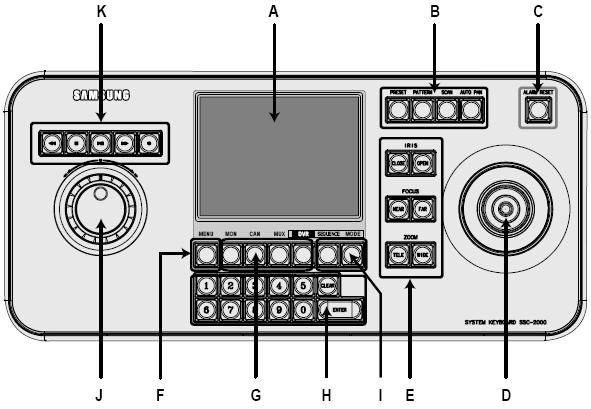
The control elements of the Samsung SSC-2000 device are described in the table.
Control element | Name | Function |
|---|---|---|
| A | LCD display | Displays the operating status of the keyboard controller |
| B | Set of buttons for changing the orientation of the camera's PTZ device | PRESET |
| C | Alarm reset button | ALARM RESET |
| D | Joystick for manual change of orientation of the camera's PTZ device | UP |
| E | Set of buttons to control the camera lens (iris, focus, zoom) | IRIS CLOSE/OPEN |
| F | Menu button | Path to the control panel settings |
| G | Device select button | MON/CAM/MUX/DVR |
| H | Digital keyboard | Is used to enter digits when required for control panel operations |
| I | Control of the camera's operating mode | SEQUENCE |
| J | Rotating disk manipulator | Used to browse in the archive |
| K | Control over camera recording and playback of archive | PLAY/PAUSE |
Note
For more information, refer to the user manual for the device you are using.
Overview
Content Tools