Unable to render embedded object: File (books.jpg) not found.
Go to documentation repository
Documentation for Axxon Next 3.5.1. Documentation for other versions of Axxon Next is [available too].

To add a comment, click the  button. A dialog box opens for entering a comment.
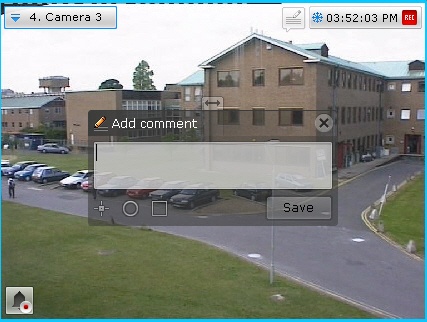
The number of characters in the comment is limited.
The following parameters can be configured:
- Position of comment in the frame (the window with the comment is movable by dragging the window title).
- Transparency of comment window, by adjusting the
 slider from left to right (from opaque to maximum transparency).
 - Marking the area of interest in the frame, with a dot (
 ), semicircle (
 ), or rectangle (
 ). To do so:
 - Click the relevant button and then click anywhere in the frame. The selected element is displayed.
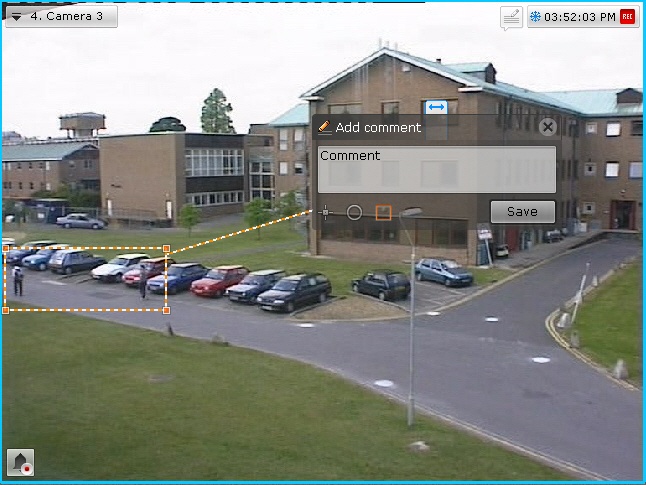
- Drag the element to the necessary place in the frame. To do so, left-click and drag the edge of the area (or for a dot, click and drag the dot).
- Set the size by dragging the corner points.
To save the comment, click the Save button. Otherwise, click  to cancel.
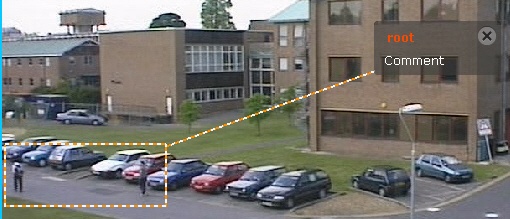
After being saved, a comment is displayed in the frame as specified. To delete the comment, before you perform any other command in the system, click the button..
Requirement for comments when classifying alarms in Alarm Management mode.
Overview
Content Tools