The Virdi zone is configured as follows:
- Go to the settings panel of the Virdi Zone object, which is created on the basis of the Virdi ACU object.
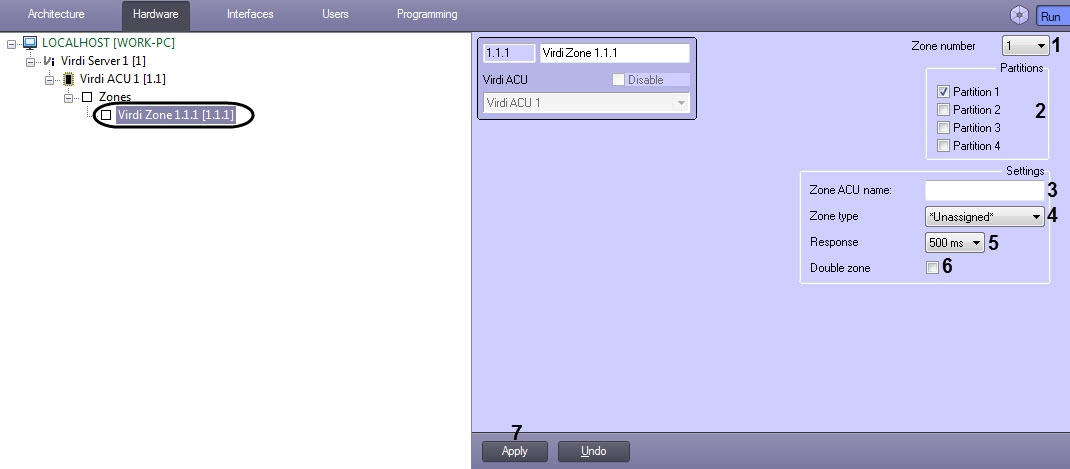
- From the Zone number drop-down list (1), select the zone number from 1 to 8.
- Set the checkboxes next to the partitions (2), which should be included in this zone.
- In the Zone ACU name field (3), enter an arbitrary name for this zone (no more than 10 characters).
- From the Zone type drop-down list (4), select the zone type:
- *Unused* - not used.
- Exit1 - this zone type has a time delay for entry and exit, which is set on the Virdi partition settings panel in the Entry delay 1 and Exit delay 1 parameters respectively (see Setting up the Virdi Partition).
- Exit2 - this zone type has a time delay for entry and exit, which is set on the Virdi partition settings panel in the Entry delay 2 and Exit delay 2 parameters respectively (see Setting up the Virdi Partition).
- Instant - this zone type is used when monitoring the zone perimeter. This zone type has no time delay and will immediately activate an alarm if the zone partition is armed and the zone is open.
- Interior - this zone type is used when monitoring the internal area of the zone and has a time delay for entry and exit, which is set on the Virdi partition settings panel in the Entry delay and Exit delay parameters, respectively. If the partition is armed and there is no delay for entry and exit, this zone will immediately activate an alarm.
- 24H Emergency - this zone type is always active, regardless of whether the partition is armed or not. This zone type is intended for alarming and monitoring.
- 24H Silent panic - this zone type is always active, regardless of whether the partition is armed or not. This zone type is intended for monitoring purposes only.
- Fire - this zone type monitors the fire alarms and malfunctions. A fire alarm occurs if the fire zone is closed, and a malfunction occurs if the fire zone is disabled.
- Arm/Disarm - when this zone is open or closed, the controller can be armed/disarmed using the external button or a signal.
- *Unassigned* - not assigned.
- From the Response drop-down list (5), select the response time of the zone status change in seconds. If the zone becomes open/closed within this time, then the state of the zone will change: 500 ms or 100 ms.
- Set the Double zone check box (6) if the zones require more than 4 hardware inputs.
- Click the Apply button (7) to apply the settings.
The Virdi zone is now configured.