You can select preferred servers that are always located at the top of the list when you start the client (see Starting the client).
To configure preferred servers, do the following:
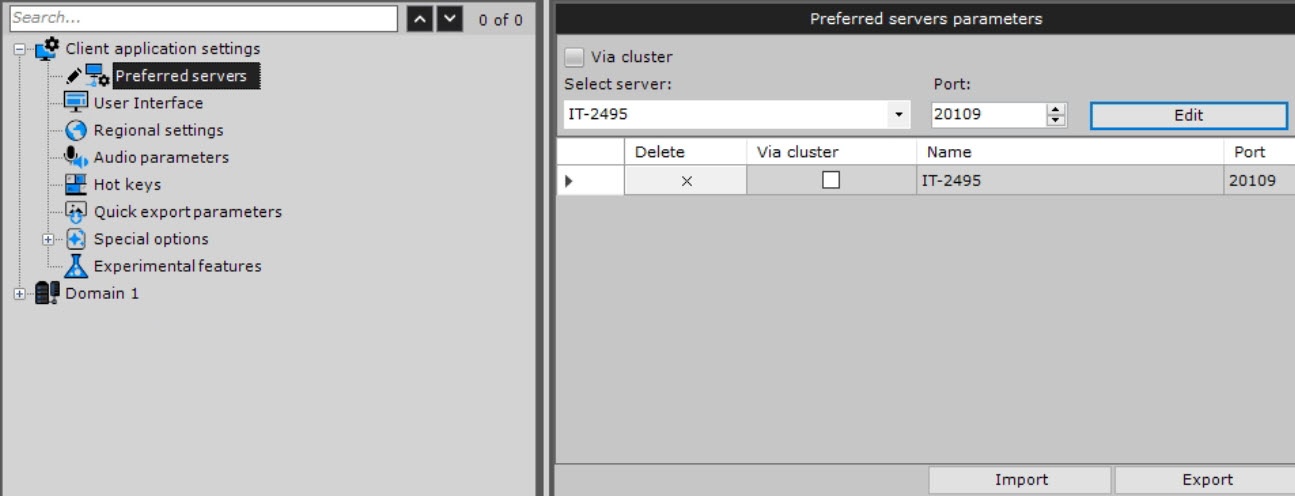
| Parameter | Value | Description |
|---|---|---|
| Select server | Select the required server from the drop-down list | |
| Port: | If necessary, change the standard port and click the Edit |
 button. To remove the server, click the
  button.
 button. To cancel an action, click the Cancel
  button.
Configuring preferred servers is complete.
To configure connection parameters to the failover system node, do the following:
 button. button. button. To cancel an action, click the Cancel button.
Configuring the client's preferred server parameters to the failover system node is complete.
You can save the list of preferred servers in the file of the JSON format by clicking the Export  button.
To load the file with preferred servers on another client, click the Import  button.
 button