
Documentation for Auto PSIM 1.0.1.

Previous page Next page

To remove Auto PSIM, do the following:

  1. In the root directory of the distribution kit, run the setup.exe file.
  2. Select the Remove operation and click the Next button.

    Notes
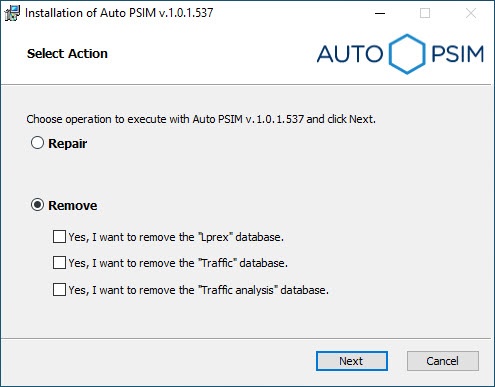
    • If you want to also remove the Auto PSIM recognizer database, set the Yes, I want to remove the "Lprex" database checkbox. In this case, the LprDB folder located at C:\ProgramData\AxxonSoft will also be deleted.
    • If you want to also remove the Auto PSIM Traffic Detection module database, set the Yes, I want to remove the "Traffic" database checkbox.
    • If you want to also remove the Auto PSIM Traffic analysis module database, set the Yes, I want to remove the "Traffic analysis" database checkbox.


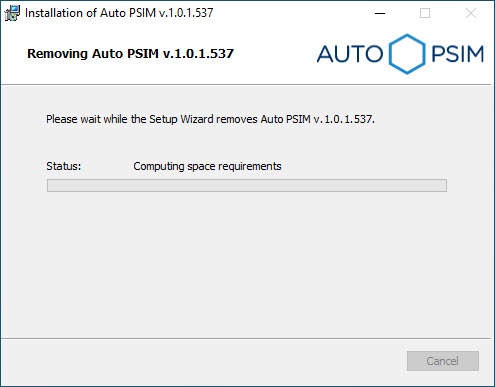
    As a result, the process of removing the installed components of the Auto PSIM package from the hard drive of the computer begins.
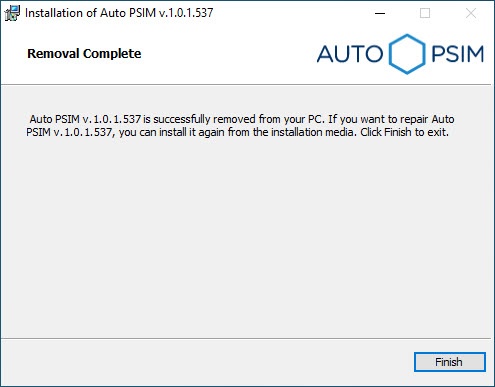
  3. After all software components are successfully removed from the hard drive, the message about the completion of the removing process is displayed. Click the Finish button.

Removal of Auto PSIM is completed.

  • No labels