
Go to documentation repository
Previous page Next page
By default, the LPR channel recognizes license plates of all vehicles passing the camera FOV: moving toward the camera and away from it. You can set the module to recognize and save the license plates of vehicles moving in certain direction: from the camera, to the camera, or any. The following results can appear as an outcome of the vehicle movement direction recognition: From the camera, To the camera, Undefined.
If traffic direction is set, then by default, if the direction of vehicle movement does not coincide with the specified value, the Entered the oncoming lane alarm event is generated. You can disable this event. If the direction of vehicle movement is undefined, the Entered the oncoming lane alarm event isn't generated.
Attention!
The availability of the parameters depends on the activated software module (for details, see The settings panel of the LPR channel object).
To select the direction of traffic for license plate recognition, do the following:
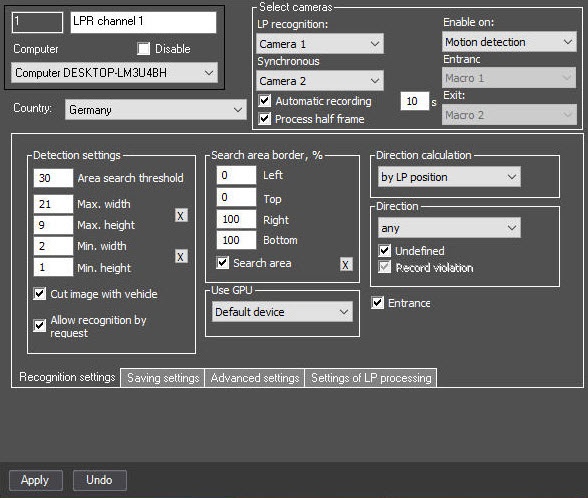
by SDK—the direction is determined by the SDK. Currently, the following license plate recognition modules support this mode: RR, VT, LPR IV.
Note
If the direction of movement is detected incorrectly or the license plate recognition stops, it is recommended to select the by LP area mode.
From the Direction drop-down list, select the traffic direction relative to the camera in which it is necessary to recognize the license plates.
Note
For the LPR IV module, the direction of carriages in the camera view is selected from left to right or from right to left.
If you select the from the camera or to the camera value in the Direction drop-down list, the Record violation checkbox becomes available. By default this checkbox is set. That means that if the direction of vehicle movement doesn't coincide with the specified value, the Entering an oncoming lane alarm event is generated. If this event must not be created, clear the checkbox.
Note
The following variations are possible depending on the selected traffic direction:
Note
This setting is taken into account in the WEB Report System PSIM when working with AUTO reports (see WEB Report System PSIM. User Guide).
The direction of traffic movement for license plate recognition is selected.

