


To configure the ZKTeco PUSH SDK integration module, do the following:
- Go to the settings panel of the ZKTeco PUSH SDK object.
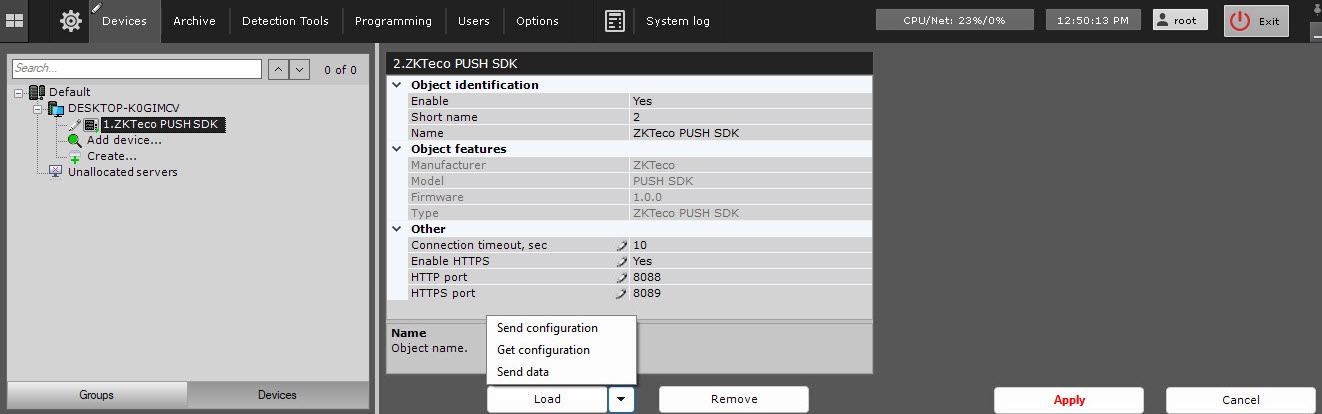
In the Connection timeout, sec field, enter the time interval in seconds after which the system stops connecting to the SDK if no response is received. The default value is 10.
If you want to use the HTTPS protocol, select the Yes value in the Enable HTTPS field and enter the HTTPS port number for connecting to the ZK Teco SDK in the HTTPS port field. The default value is 8089.
In the HTTP port field, enter the number of the HTTP port for connecting to the ZK Teco SDK. The default value is 8088.
Click the Apply button to save the settings.
- Click the
 button and select Get configuration from the drop-down list to automatically download the configuration and build the hardware tree.
 - Click the button and select Send configuration from the drop-down list to send the complete configuration to the hardware after making all the necessary changes.
- Click the button and select Send data from the drop-down list to write access parameters to end devices.
- Click the Apply button.
Configuration of the ZKTeco PUSH SDK integration module is complete. As a result, a hardware tree is built: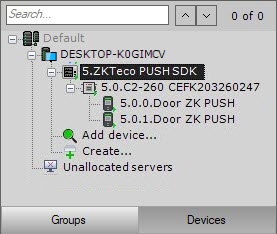
Overview
Content Tools