
Go to documentation repository

Documentation for Face PSIM 1.0.1.
Previous page Next page

The following figure shows the Monitoring of captured and recognized faces window interface:
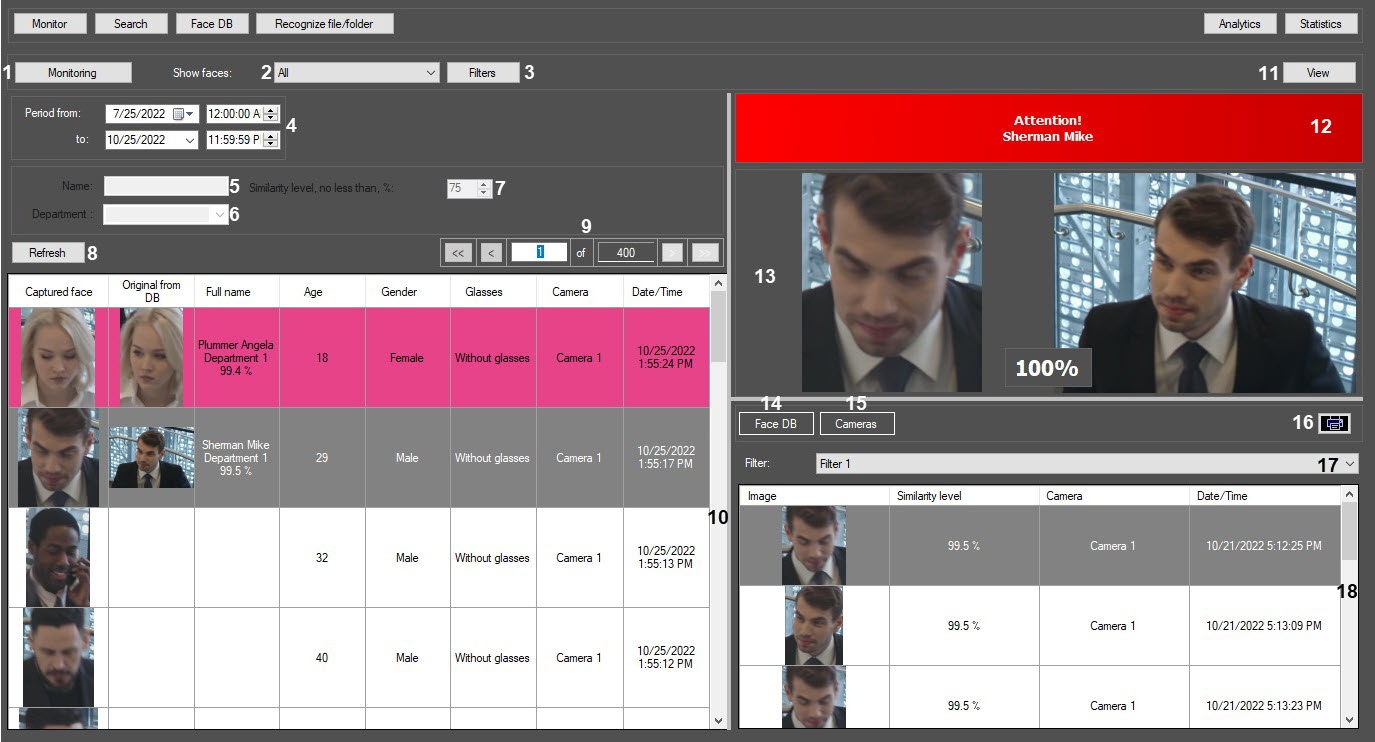
The components of the Monitoring of captured and recognized faces interface are described in the following table.
Number of component | Comments |
|---|---|
1 | The Monitoring button |
| 2 | Show faces drop-down list to select the captured persons display option: All, Only recognized, Only unrecognized |
| 3 | The Filters button for filtering by cameras and additional face characteristics |
4 | Elements for setting the start and end date and time of the time interval for face search |
| 5 | The Name field for entering the name of a recognized person Note. The field is editable if the Only recognized option is selected in the Show faces drop-down list. |
| 6 | The Department field for selecting the department of a recognized person Note. The field is editable if the Only recognized option is selected in the Show faces drop-down list. |
| 7 | The Similarity level, no less than, % field for setting the minimal similarity level Note. The field is editable if the Only recognized option is selected in the Show faces drop-down list. |
8 | The Refresh button for updating the displayed data |
| 9 | Elements for navigation through captured faces |
| 10 | Filtered list of captured faces The following columns are displayed:
|
| 11 | The View button for configuring the view of the monitoring window |
| 12 | The field for displaying the full name of the recognized person |
| 13 | Photos of the captured face and the reference image, the information on which is stored in the face database |
| 14 | The Face DB button for displaying in the area (19) the information on the selected recognized face |
| 15 | The Cameras button for displaying in the area (19) the ten last captured faces according to the selected search filter (18) |
| 16 | The Print button * for exporting the filtered data to a report file |
| 17 | A drop-down list for selecting the search filter (see The Face Search window) |
| 18 | The area for displaying search results with the specified filtering conditions. When the Face DB section is selected using the Face DB button (14), the following columns are displayed:
When the Cameras section is selected using the Cameras button (15), the following columns are displayed:
|
* The element's name is not displayed in the settings panel.
Overview
Content Tools