
Go to documentation repository
Documentation for Axxon One 3.0/3.1 version. Documentation for Axxon One 2.0 version is also available.

Tibbo input/output boards allow for monitoring air temperature and humidity on your premises.
To add a board to the configuration, do the following:
- Go to the IP Device Discovery Wizard (see Search, add, configure, and remove IP devices).
- In the Vendor list, select Tibbo (1).
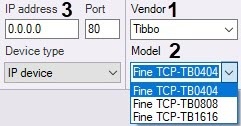
- Select your board from the Model list (2).
- Enter the IP address of the board (3).
- Click the
 button.
The parent IP Server object, and Channel, Input and child objects under it will be added.
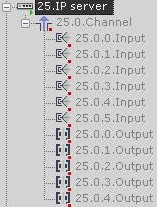
To configure the board, do the following:
- Select the IP Server.
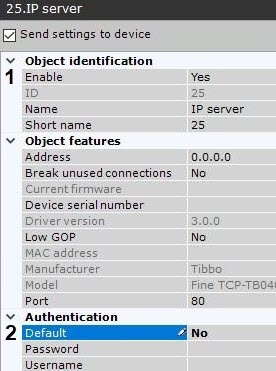
- Activate the object (1).
- In the Authentication parameter group, set Default to No (2).
- Select a Channel object.
- Activate the object (1).
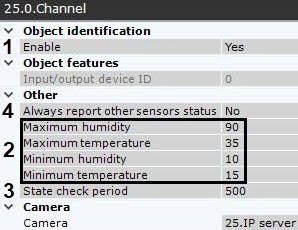
- Set permissible ranges for temperature (in centigrade) and relative humidity (in percent) (2). If a reading falls out of the range, the corresponding input (sensor) generates an event.
- Set the check period in milliseconds (3).
If you need to report sensor statuses when readings are within the range, set Yes for Always report other sensors status (4). In this case, the following records will appear in the log file in specified intervals of time (see step 7):
Special humidity ray#16 changed status to: false ,Sensor value: 16,8 Correct range [15, 58]. Time: …..
Special temperature ray#17 changed status to: false ,Sensor value: 29,8 Correct range [20, 60]. Time: …..
- Click the Apply button.
Now, the board is configured. The current temperature/humidity value will be displayed next to the input icon on the map (see Configuration of maps).
Overview
Content Tools