
Go to documentation repository
Documentation for Axxon One 3.0/3.1 version. Documentation for Axxon One 2.0 version is also available.

On the page:
Configuring the parameters
To create the Sitting person detector, do the following:
- Create the Human pose detector (see Configuring the Human pose detector).
- Below the Human pose detector, click Create… → Sitting person detector.
By default, the Sitting person detector generates an event if a sitting person is detected in the specified area.
If necessary, you can change the detector parameters. The list of parameters is given in the table:
| Parameter | Value | Description |
|---|---|---|
| Other | ||
| Enable | Yes | The detector is enabled by default. To disable the detector, select the No value |
| No | ||
| Name | Sitting person detector | Enter the detector name or leave the default name |
| Type | Sitting person detector | Name of the detector type (non-editable field) |
| Basic settings | ||
| Number of measurements in a row to trigger detection | 2 | Specify the minimum number of frames with the corresponding pose or behavior for the detector to generate an event. The value must be in the range [1, 20]. |
To save the parameters of the detector, click the Apply  button. To cancel the changes, click the Cancel
  button.
Configuring the detection area
To configure the detection area, do the following:
- In the preview window, click the
 button.
 - Click in the preview window.
- Select Detection area.

- Using the anchor points
 , set the detection area in which a sitting person must be detected.
Note
- For convenience of configuration, you can "freeze" the frame. Click the
 button. To cancel the action, click this button again.
 - To hide the detection area, click the
 button. To cancel the action, click this button again.
 - To delete the detection area, click the
 button.
- For convenience of configuration, you can "freeze" the frame. Click the
- Click the Apply
 button.
Configuration of the detection area is complete.
Configuring the frame perspective
If a camera angle doesn't meet the requirements (see Video stream and scene requirements for the Human pose detector and its sub-detectors), this can result in false events. In this case, we recommend configuring the frame perspective using the leveling rods.
For this, do the following:
- In the preview window, click the
 button.
 - Click in the preview window.
- Select Leveling rod.

- Specify the size of the same person in different parts of the frame by eye:
- To create a leveling rod, left-click the video image to add two anchor points.
Set at least three calibration rods. The lower anchor points of any three rods must not be located on the same line (horizontal, vertical, slanting, and so on).
- The size of the leveling rod must be about the average height of a person at this part of the frame.
- You can resize the rod by stretching its anchor points
 . You can move it on screen by dragging and dropping.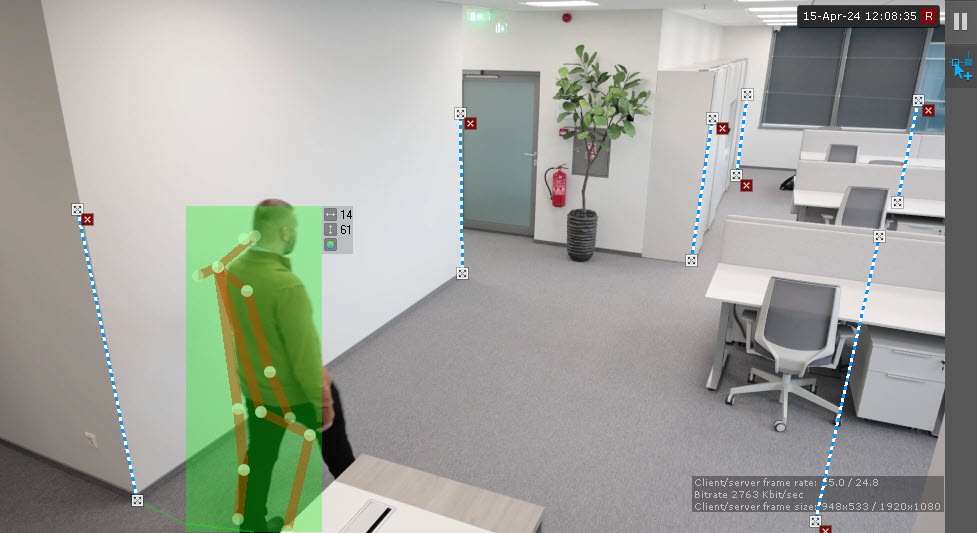
Attention!
When you set up leveling rods, the following conditions must be met:
- the rods that are located at the same distance from the camera lens must be of the same size;
- the feet of the rods must be located on the same surface (for example, floor);
in complex scenes, we recommend adding more than three rods to increase the accuracy of the detection;
in the parts of the frame where the lens vertical distortion is observed, the rods must be parallel to the nearest vertical objects (for example, door, wardrobe);
- for portrait-oriented scenes (such as corridor, shopping aisle, warehouse aisle, and so on), the arrangement of the rods must form triangles.
Note
- For convenience of configuration, you can "freeze" the frame. Click the
 button. To cancel the action, click this button again.
 - The area for detection is displayed by default. To hide it, click the
 button. To cancel the action, click this button again.
 - To delete a rod, click the
 button.
- Click the Apply
 button.
Configuration of the Sitting person detector is complete.
Overview
Content Tools