
Go to documentation repository


Event Board display some or all system events.
To configure an Event Board:
- Add an information board to the layout (see Adding information boards to cells).
In the upper right corner, click the
 button.
- To allow operators to hide the information board, set the Allow hiding panel checkbox (1).
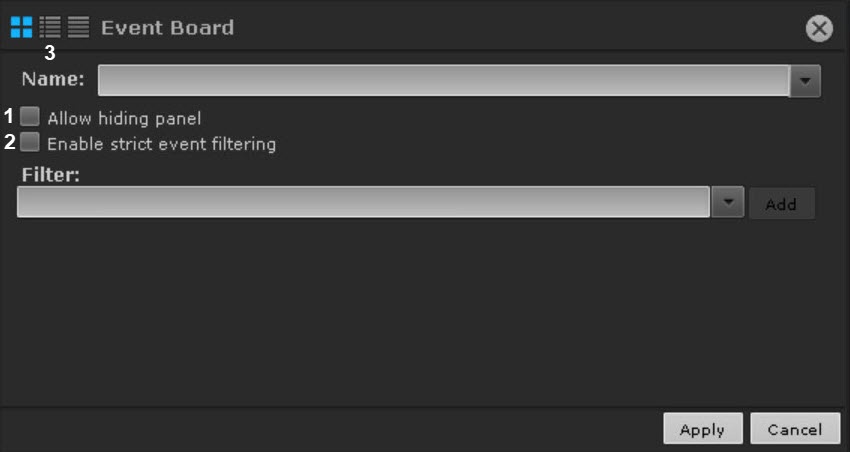
By default, some events on the Event Board come with audit events. If display of audit events isn't required, set the Enable strict event filtering checkbox (2).
In the list, select the event types that you want to display on the board and click Add.
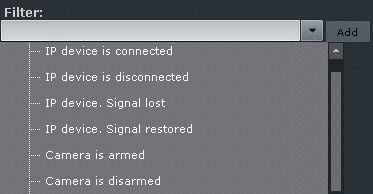
To add events of the same type from different devices, enter the name of the event in the Filter field. This will list only the events of the chosen type. To list all events, clear the Filter field.
Note
To remove an added event type, click the
 button.
If no event type is selected, all system events are displayed on the information board.
Note
- You can also add any text to the filter. For example, if you add the Signal lost filter, Event Board will display event data from all devices in the system.
- To display events from the Face Detection, we recommend that you select two events: Triggered detection "Face appeared" and Triggered specified detection "Face appeared".
- Select the default view for information on the Event Board (see Options for displaying information on the Event Board): the first frame of the event and time, first frame and text, or text only (3).
- Click the Apply button to save the changes.
Configuration of the Event Board is complete.
Overview
Content Tools