
Go to documentation repository
Documentation for Axxon One 3.0/3.1 version. Documentation for Axxon One 2.0 version is also available.

The Events filter component is used to select the type of events that must be displayed on the archive navigation panel.
To select a certain event type, do the following:
- Click the Events filter button.
- By default, the Select all checkbox is set, and the archive navigation panel displays all events. To display the required events, clear the checkbox.
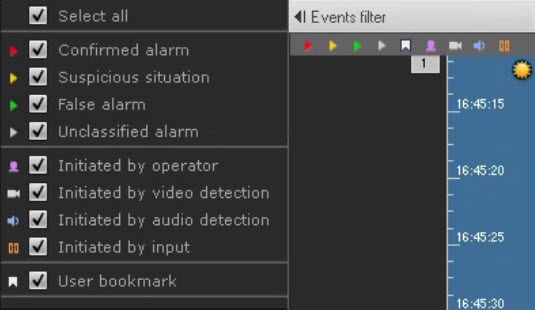
- Set the checkboxes for the types of alarms that must be displayed on the archive navigation panel according to their status:
- Confirmed alarm.
- Suspicious situation.
- False alarm.
Unclassified alarm.
Note
If you clear the checkbox for a certain type of alarm, this type of alarm and the corresponding track are no longer displayed on the timeline (see The Timeline).
- Set the checkboxes for the types of alarms that must be displayed on the archive navigation panel according to the cause of their initiation:
- Initiated by operator.
- Initiated by a video detection (service or embedded detectors, including their sub-detectors).
- Initiated by an audio detection (service or embedded detector).
Initiated by input.
Attention!
- By default, all checkboxes are set.
- To display alarms on the timeline, select at least one type of alarm event and one initiator.
- Set the User bookmark checkbox if you want to display all created user bookmarks.
- Click the Events filter button again to close the events filter.
Selection of events is complete. Events of the selected type are displayed on the timeline (see The Timeline) and in the events list (see Events List).
Overview
Content Tools