
Go to documentation repository
Documentation for Axxon One 3.0/3.1 version. Documentation for Axxon One 2.0 version is also available.

On the page:
General information
The Log management utility is used to:
- configure the server log storage and archiving options (see Configuring the Server log storage and archiving options),
- configure the client log storage options (see Configuring the Client log storage options),
- configure logging levels of the Axxon One server and client (see Configuring logging levels).
By default, information about all system events is recorded in the Axxon One system log that is stored in a local database of the server (see System log). It is possible to record information about required events in log files stored in local directories of the server. Log data is archived at set intervals. You can configure these features using the Log management utility.
Axxon One component | Log storage directory |
|---|---|
Server | <Axxon One installation folder>\Logs |
Client | <System disk>:\Users\<Current Windows user>\Appdata\Local\AxxonSoft\Axxon One\Logs |
Starting the utility
You can start the utility from the Start menu: Start → All Programs → Axxon One → Utilities → Log management utility.
Note
The LogRotateUtility.exe executable file of the Log management utility is located in the <Axxon One installation folder>\AxxonSoft\Axxon One\bin\ folder.
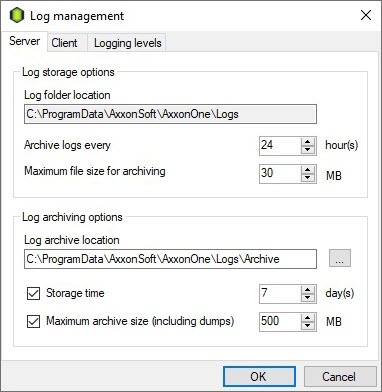
The Log management window opens:
Stopping the utility
To exit the Log management utility, click the  button or the Cancel button.
Configuring the server log storage and archiving options
To configure the server log storage and archiving options, do the following:
- Run the Log management utility (see Starting the utility).
- Go to the Server tab.
- In the Log storage options section:
- In the Log folder location field, enter the full path to the directory where you want to store the server logs. The default value is <Axxon One installation directory>\Logs.
- In the Archive logs every field, enter the interval for system log archiving in hours. The default value is 24.
- In the Maximum file size for archiving field, enter the size of the log file in megabytes. When the specified size is reached, the logs are archived. The default value is 30.
- In the Log archiving options section:
- In the Log archive location field, enter the full path to the directory where you want to place the log archives. To set the path using standard Windows methods, click the
 button. The default value is <Axxon One installation directory>\Logs\Archive.
 - In the Storage time field, enter the maximum time of storing a log in the archive in days after which the log is deleted. The default value is 7.
In the Maximum archive size (including dumps) field, enter the maximum size of the archive above which the earliest logs are deleted from the archive. The default value is 500.
Note
- Maximum archive size (including dumps) takes priority over Storage time. The earliest logs, the storage time of which hasn't yet expired, are automatically deleted if the archive size exceeds the maximum value.
- If you don't want to limit the logs storage time and/or archive size, clear the checkboxes in the Log archiving options section.
- In the Log archive location field, enter the full path to the directory where you want to place the log archives. To set the path using standard Windows methods, click the
- Click the OK button.
Configuring the server log storage and archiving options is complete.
Configuring the client log storage options
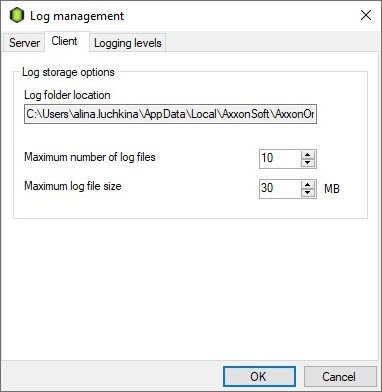
To configure the client log storage options, do the following:
- Run the Log management utility (see Starting the utility).
- Go to the Client tab.
- In the Log storage options section:
- In the Log folder location field, enter the full path to the directory where you want to store the client logs. The default value is <System disk>:\Users\<Current Windows user>\Appdata\Local\AxxonSoft\Axxon One\Logs.
- In the Maximum number of log files field, enter the maximum number of log files. The default value is 10.
- In the Maximum log file size field, enter the maximum log size in megabytes. When the specified size is reached, a new log file is created. The default value is 30.
- Click the OK button.
Configuring the client log storage options is complete. You can also specify the period of adding information to the client log (see Configuring the logging of the Client memory usage).
Configuring logging levels
Logging levels are distinguished from each other by the list of events to be recorded in external logs, as well as the level of event detail (low, medium, high).
To configure the logging level, do the following:
- Run the Log management utility (see Starting the utility).
- Go to the Logging levels tab.
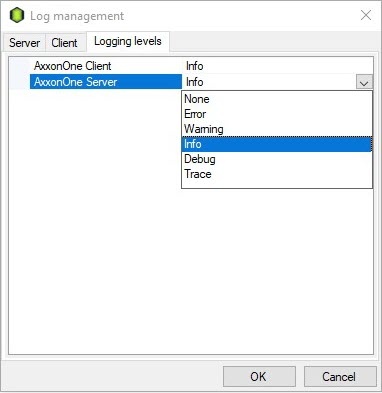
- In the AxxonOne Client field, select the required client logging level from the drop-down list. The default value is Info. Logging levels are described in the table.
- In the AxxonOne Server field, select the required server logging level from the drop-down list. The default value is Info. Logging levels are described in the table.
Logging level
Level of event detail
Description
None
No
Event logging disabled
Error
Low
Only system errors are logged
Warning
Low
Only system warnings and system errors are logged
Info
Low
Informational messages, system warnings, and system errors are logged
Debug
Medium
Debug events, informational messages, system warnings, and system errors are logged
Trace
High
All system events are logged
Attention!
- If you change the server logging level, the server restarted (see Start and stop Axxon One).
- If you installed Axxon One in the Failover server and client mode (see Installation), the Client and Supervisor logging levels are selected (see Configuring Failover VMS).
- You can change the client logging level when:
- the client is completely stopped;
- you restart the client after making changes to the logging level.
- Click the OK button.
Configuring logging levels is complete.
Overview
Content Tools