
Go to documentation repository


Axxon PSIM supports automatic video recording upon alarm events registration for each Camera system object individually. By default, the auto-recording option is enabled for all cameras registered in the Hardware tab.
You can disable auto-recording upon alarms for each camera individually as well.
To disable auto-recording upon alarm event registration for a selected camera, do the following:
- Go to the Hardware tab in the System settings window.
- Select the Camera object in the object tree that corresponds to the adjusted camera.
- Go to the Basic settings tab on the settings panel of the Camera object.
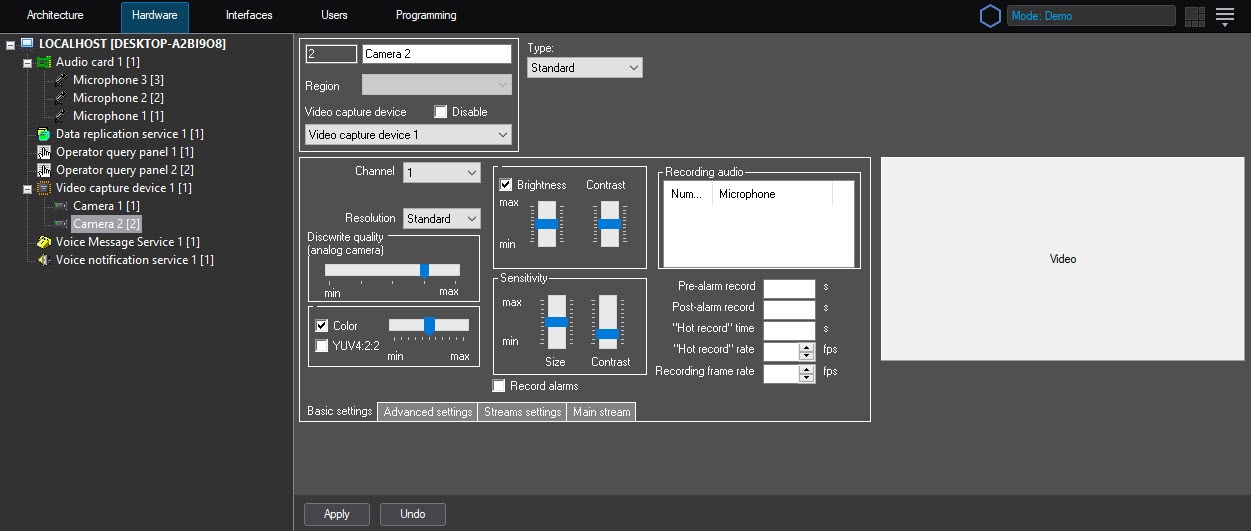
- Clear the Record alarms checkbox.
- Click the Apply button.
Disabling automatic recording upon alarm event registration for a selected camera is complete.
Note
To re-enable the auto recording option, repeat the above steps and set the Record alarms checkbox.
Overview
Content Tools