
Go to documentation repository


To configure the failover service, configure backup servers as follows:
- Create the Failover service object on the basis of the Computer object corresponding to the backup server on the Hardware tab of the System settings window.
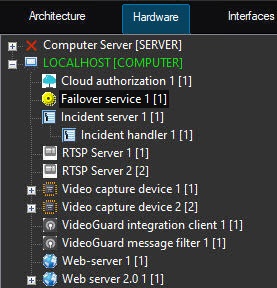
- Go to the settings panel for the Failover service object.
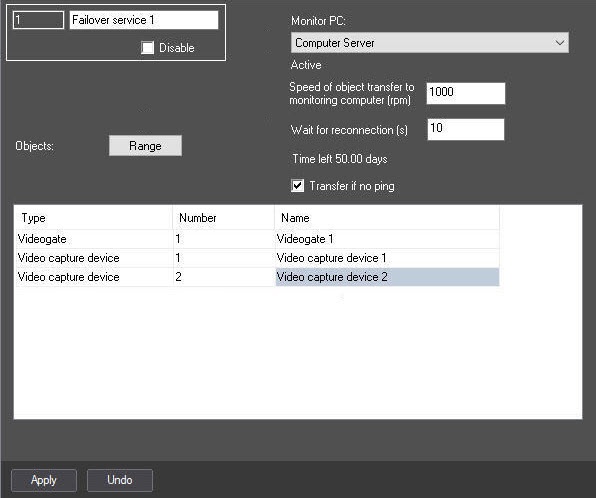
- From the Monitor PC drop-down list, select the name of the Computer object the connection with which must be controlled.
- In the Speed of object transfer to monitoring computer (rpm) field, specify the speed of transferring objects in case the connection is lost. The default value is 1000. This setting is necessary so that the failover server sends messages at a certain speed and the receiving server has time to process them. You must set the transfer speed depending on the network speed, server bandwidth, and so on.
- In the Wait for reconnection (s) field, specify the time period in seconds after which the configuration is transferred to the backup server since the server connection fails.
- If you set the Transfer if no ping checkbox, then when you log out and reload the backup server, a ping from the main monitored server is checked, and if there is no response during the time specified in the Wait for reconnection (s) field, the forced configuration transfer occurs (the FORCED_START reaction of the forced transfer, see FAILOVER Failover service). If you clear the checkbox, a response from the main monitored server isn't tracked during the start of the backup server, and the configuration isn't transferred even if the main server is unavailable.
- In the Objects table, specify the list of configuration objects of the main server that must be transferred to the backup server if connection fails in one of the following ways:
- Manually, one by one:
From the Type drop-down list, select the object type.
Note
You cannot select the Manager of failover services object type. These objects aren't transferred to the backup servers, as each backup server must have its own Manager of failover services.
- From the Number drop-down list, select the object ID.
- The Name field is automatically filled in with the name of a corresponding object.
Repeat steps for all objects in the objects tree of the controlled server that must be transferred to the backup server if the connection fails.
Note
To add a new line in the table, click the downwards ↓ button on the keyboard.- Click the Apply button.
- As a group:
- Click the Range button. The Range window is displayed.
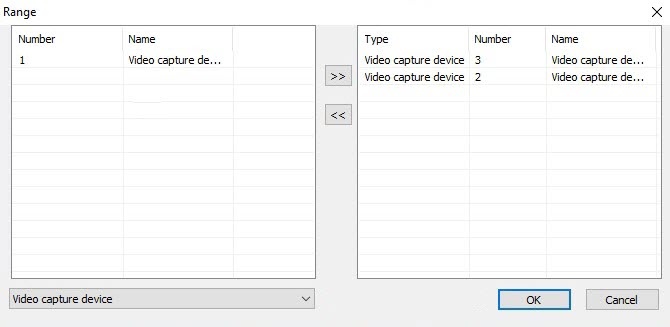
From the drop-down list, select the object type.
Note
You cannot select the Manager of failover services object type. These objects aren't transferred to the backup servers, as each backup server must have its own Manager of failover services.
- In the table, mark the required objects of this type. To mark several objects, hold the Ctrl key on the keyboard.
Click the
 button to move the selected objects to the list of the monitored objects that is located in the right part of the Range window.
Note
The button is used to move an object back from the list of the monitored objects to the list of the available ones.
- Repeat steps for all required objects.
- Click the OK button.
- Click the Apply button.
- Click the Range button. The Range window is displayed.
- Manually, one by one:
- Repeat steps 1—6 for all main servers in the distributed system that are controlled by the configured backup server.
Configuring the failover service is complete.
Attention!
For SIP-terminal, you must additionally specify the IP address of the backup server in the sip_terminal.config file (see Configuring a SIP-terminal for Failover service).
Overview
Content Tools