
Go to documentation repository


In Axxon PSIM, archive recording is performed on a loop (see General information on video archiving). Due to this, old archive recordings can be replaced by new ones. But sometimes it is required to protect important recordings from loop recording. In such a case, you must grant the operator the rights to protect files from overwriting.
Protected files are moved to the PROTECTED folder in the VIDEO folder on the disk with the archive. When you remove file protection, it is moved back to the folder from which it was taken if it still exists. If you have already removed this folder since all files in it were overwritten, the file remains in the PROTECTED folder but isn't displayed in the surveillance monitor. Later, this file is deleted by loop recording.
To give rights to protect archive files from overwriting:
- Go to the Users tab in the System settings window (1).
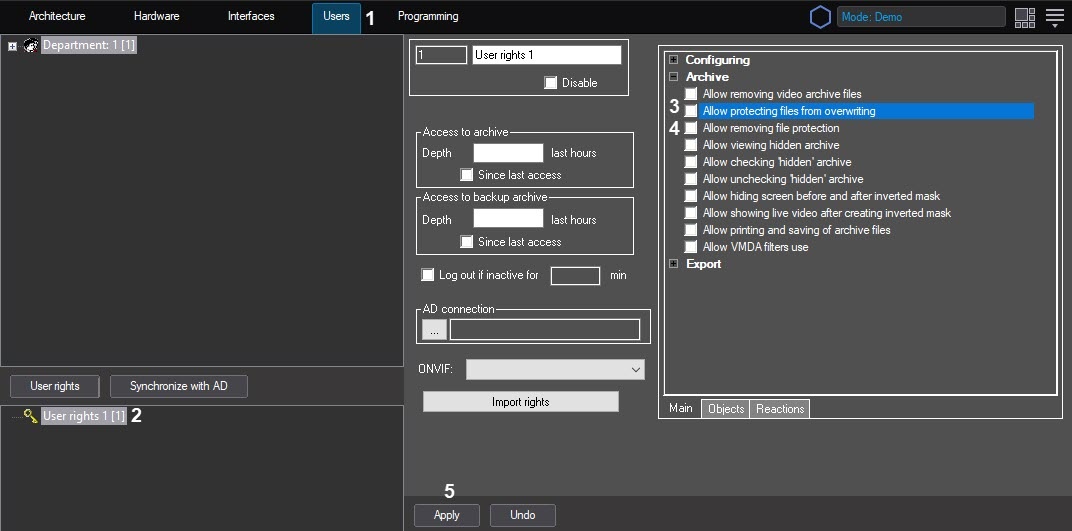
- In the object tree located under the User rights button in the Users tab, select the same-name object corresponding to the operator access rights that you want to change (2).
The settings panel of the User rights object is displayed in the right part of the System settings window. - To allow the operator to protect archive files from overwriting, set the Allow protecting files from overwriting checkbox (3). Don't set this checkbox if the operator must not have this right.
- To allow the operator to disable protection of files protected from overwriting, set the Allow removing file protection checkbox (4). Don't set this checkbox if the operator must not have this right.
- Click the Apply button (5).
Configuring operator rights for protecting archive files from overwriting is complete.
Overview
Content Tools