
Go to documentation repository


To allow the operator to remove files from the archive (both main and backup), do the following:
- Go to the Users tab in the System settings window (1).
- In the object tree that is below the User rights button in the Users tab, select an object corresponding to the operator access rights that you want to change (2).
The settings panel of the User rights object is displayed in the right part of the System settings window.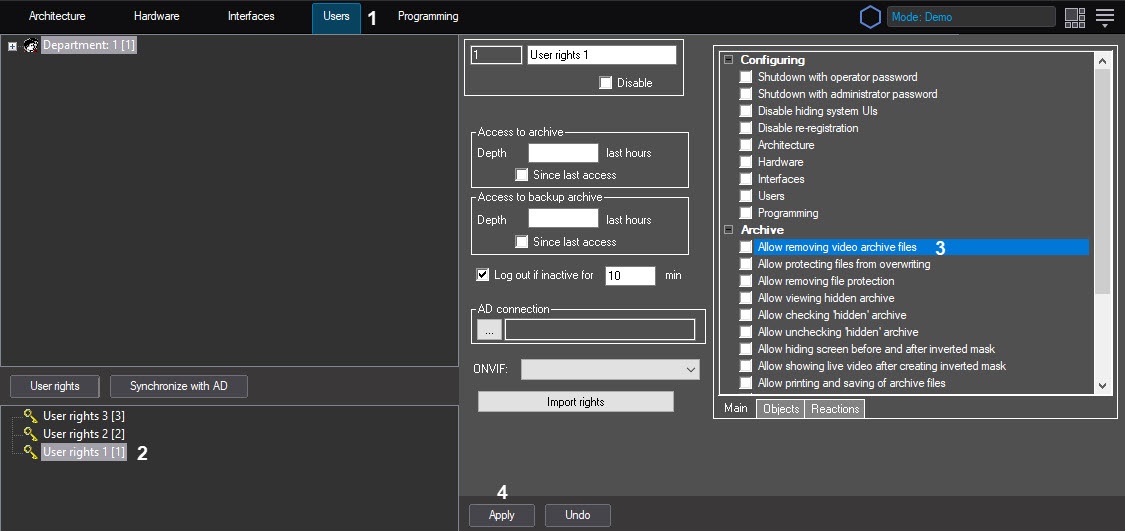
- To allow the operator to remove files from the archive, set the Allow removing video archive files checkbox (3). If the operator is not allowed to remove video archive files, leave this checkbox clear.
- To save the changes in Axxon PSIM, click the Apply button (4).
Note
Videos can be deleted in one of the following ways:
- From the interface of the video surveillance monitor—see Deleting video recordings from the archive.
- Using the ARCH_DEL_RECORD reaction of the CAM object that is executed using the script or program—see CAM Camera.
The operator now can remove video archive files.
Overview
Content Tools