
Go to documentation repository

Documentation for Axxon PSIM 2.0. Documentation for other versions of Axxon PSIM is available too.
Previous page Next page

On the page:
Purpose
The universal telemetry control panel is used to control PTZ devices connected to the system (for example, a camera PTZ device).
Functions
The universal telemetry control panel has the following functions:
- Control of the camera PTZ device.
- Control of the lens zoom (zoom in on the image).
- Focus adjustment.
- Select and set custom settings for the PTZ device.
Interface description
The figure shows the interface of the universal telemetry control panel. 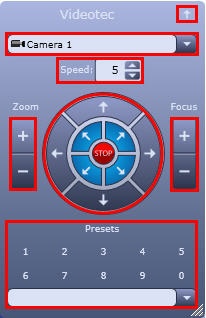
Interface elements of the universal telemetry control panel are described below.
- The
 button minimizes the window of the universal telemetry control panel (minimizes the client's window, leaving only the header).
 - From the
 drop-down list, you can select the camera whose PTZ device you want to control.
 - In the
 field, specify the relative speed of camera rotation when you control the PTZ device of this camera.
  Controls the orientation of the camera lens.
- The
 buttons control the zoom of the camera lens (zoom in/out on the image).
 - The
 buttons set the camera focus. If the camera supports the autofocus function, then this feature is enabled when you click the
  caption.
 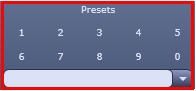 Selects and sets custom settings for the PTZ device.
 Changes the size of the universal telemetry control panel.
Overview
Content Tools