
Go to documentation repository

Documentation for Axxon PSIM 2.0. Documentation for other versions of Axxon PSIM is available too.
Previous page Next page

You can use the Schedule (1) tab to configure archiving in automatic mode.
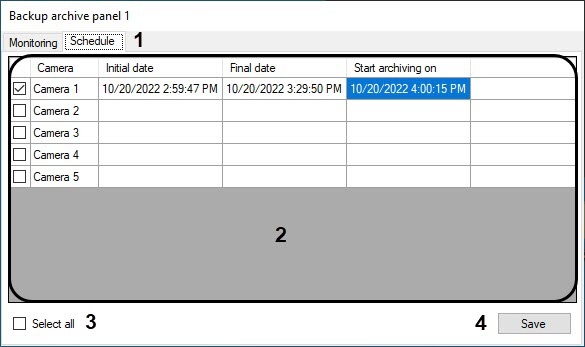
The table (2) shows the current schedule for archiving videos from all available cameras. For each camera, the initial and final dates of archiving are provided, as well as the actual start time of the archiving process.
To activate and deactivate the specified schedule for the camera, set (clear) the checkbox next to the corresponding camera. In addition, you can use the Select all (3) checkbox to select (or cancel the selection of) all cameras in the table.
You can edit a schedule by editing the contents of the corresponding table cells. For example, to edit the final date of the first camera recording, double-click Camera 1: Final date.
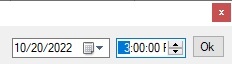
In the window that opens, specify the date and time and click Ok.
After you set up a schedule for all required cameras, click Save (4).
Note
Scheduled archiving in automatic mode always occurs when the software is running, even if the backup archive panel is disabled.
Overview
Content Tools