
Go to documentation repository

Documentation for Axxon PSIM 2.0. Documentation for other versions of Axxon PSIM is available too.
Previous page Next page

On the page:
Indication of microphone status
The microphone icon on the map is shown in the figure.

The microphone status is indicated by the color of the icon used to show the microphone on the map.
- Blue
 Microphone is ready for recording, but it is not armed.
 - Red
 Microphone is recording, an alarm event has been registered.
 - Green
 Microphone is ready for recording, and it is not armed.
 - Yellow
 Microphone is not ready for recording, but it is armed.
Microphone control
You can control the microphone via the function menu of the given microphone icon shown on the map.
You can access the function menu of the microphone by right-clicking the corresponding microphone icon.
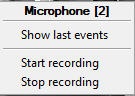
The function menu of the microphone provides access to various functions of the microphone.
Item of the function menu | Function | Comments |
|---|---|---|
Microphone No./Recording date and time | Displays an identifier of the selected microphone in the program, as well as the type, date and time of the latest recording | |
Start recording | Arms the microphone and starts recording | See Arm and disarm microphones |
Stop recording | Disarms the microphone and stops recording |
Overview
Content Tools