
Go to documentation repository

Documentation for Axxon PSIM 2.0. Documentation for other versions of Axxon PSIM is available too.
Previous page Next page

In Axxon PSIM, videos are archived to the storage device. After you install Axxon PSIM, specify the local disks on which the video archive is recorded in the settings of the Computer system object (the Hardware tab).
Note
We recommend using disks with the NTFS file system for storing video archives. If you use the FAT32 file system, there may be problems due to the features of this file system, particularly with the absence of logging.
To select disks for the archive, do the following:
- Go to the Hardware tab in the System settings window (1).
- Select the Computer object corresponding to the configured server in the objects tree of the Hardware tab (2). The settings panel of the selected object is displayed on the right side of the Hardware tab. Each local disk available for archiving has the checkbox of the same name in the Archive disks group (3).
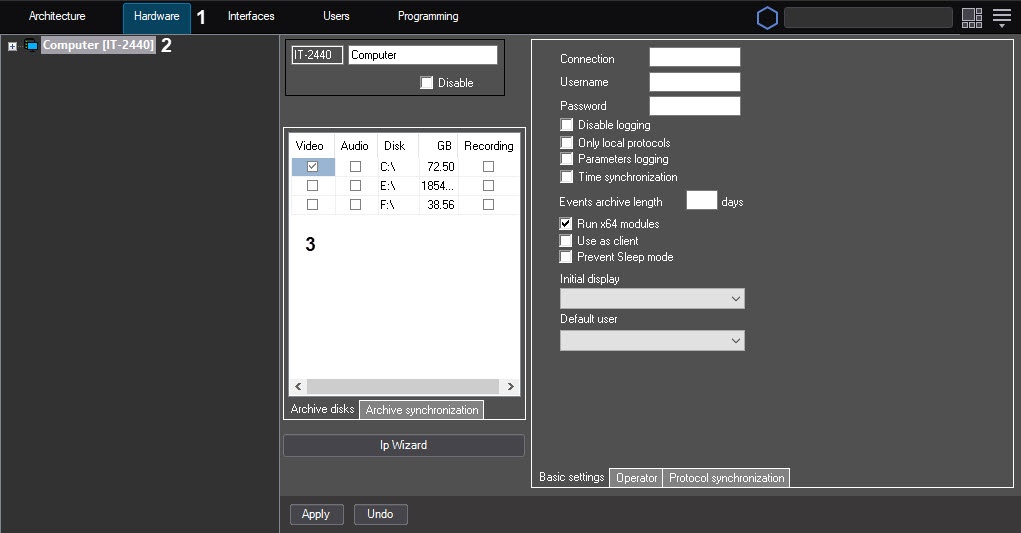
Set the checkbox in the Video column next to the disk that you want to select. Local, network, and USB disks are available for storing (for more information on adding network disks, see the Using network disks section).
Note
For the reverse effect, clear the checkbox corresponding to the disk in the Video column.- Click the Apply button.
Selecting disks for video archive storage is complete.
Note
If you don't select any disk for storing video recordings, a video isn't saved to the archive. In this case, the icon of the missing disk for recording the archive appears in the lower left corner of the surveillance window. You can remove this icon by creating the ShowDetachedState=0 registry key (see Registry keys reference guide, for more information on working with the registry, see Working with Windows OS registry).
Overview
Content Tools