
Go to documentation repository

Documentation for Axxon PSIM 2.0. Documentation for other versions of Axxon PSIM is available too.
Previous page Next page

As a rule, the standard sound card digitizes up to two audio signals.
Each standard sound card is registered in Axxon PSIM by creating and configuring the Audio card object. The Audio card objects are created on the Hardware tab on the basis of the Computer object. When you create Audio card objects for each standard sound card, you must assign values to the Board parameter corresponding to the numeration order: for the first Audio card object, you must select the FS 6 (0) value from the list, for the second—FS 6 (1), and so on.
Example of configuring the Board parameters for Realtek standard sound cards:

A. at one standard sound card registration

B. at registration of two standard sound cards of the same type
To register the microphones connected to the input audio channels of the standard sound card in Axxon PSIM, create Microphone objects on the basis of the Audio card object. You can create up to two Microphone objects on the basis of one Audio card object. The corresponding hardware tree segment displays the registration of the standard sound card and two microphones in the figure.
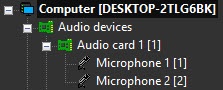
After you complete the registration of the sound card in Axxon PSIM, you must assign the values to the Channel parameter settings of the Microphone objects, corresponding to the number of channels of the microphone connections to the standard sound card.
To connect more than one microphone to the standard sound card, use the mini jack 2xRCA adapter. The scheme of the mini jack 2xRCA adapter inputs numeration is shown in the figure.
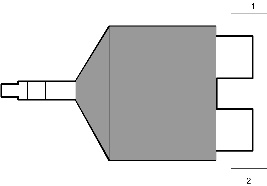
Examples of the Microphone objects configuration with one and two FS-5 video capture cards, registered in Axxon PSIM, are shown in the figure.

A. for one standard sound card
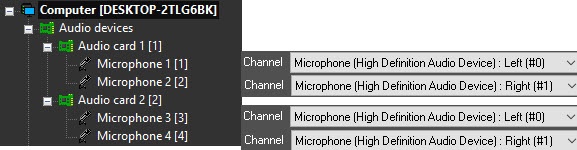
B. for two standard sound cards
Overview
Content Tools