
Go to documentation repository

Documentation for Axxon PSIM 2.0. Documentation for other versions of Axxon PSIM is available too.
Previous page Next page

The workability software control allows restarting a module or the Axxon PSIM core if there is no response from this module.
To configure the software control of workability, do the following:
- Go to the settings panel for the System restart service object.
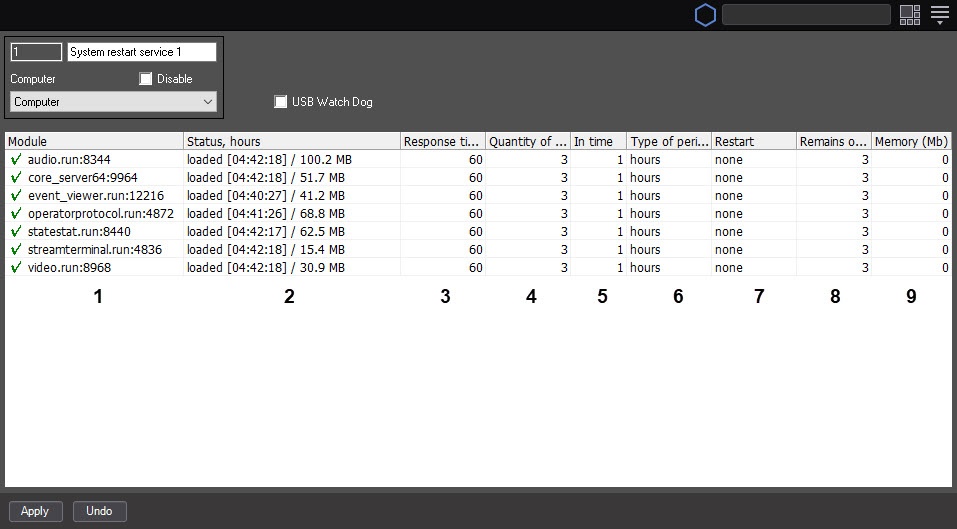
The list of modules running on this computer is automatically displayed in the Module column (1).
Note
Modules whose state is determined as In process are marked with the sign. Modules whose state is determined as No response (red field) or Shutdown are marked with the ! sign.
- The current state of modules is automatically displayed in the Status, hours column (2). The square brackets display the module working time since the last restart in the HH:MM:SS format.
In the Response timeout, sec field, enter the time period in seconds during which the response from the module is awaited (3).
Note
You can restart the system if there is no response from the module after the waiting interval.- In the Quantity of restarts field (4), enter the maximum number of restarts (module or the Axxon PSIM core) that can be performed within the specified period.
- In the In time field (5), enter the new numerical value and/or select from the Type of period drop-down list (6) the required metric unit of period if you want to change the value of the time period during which the maximum number of restarts can be performed.
- From the Restart drop-down list (7), select the required way of restart.
- Select the module option if you want to restart the module without a response.
Select the core option if you want to restart the Axxon PSIM core when there is no response from the module.
Note
In case you don't want to restart the system when there is no response from the module, select the none value.
The remaining number of restarts during the current time period is automatically displayed in the Remains of restarts column (8).
Note
The module switches to the Shutdown state if the number of performed restarts exceeds the maximum one during the current time period.Note
The counter of the remaining restarts can reset in the following cases:
1. The counter is reset upon the new restart if the time period during which the maximum number of restarts can be performed expires and the number of performed restarts doesn't exceed the maximum one.
2. The module restarts and the counter is reset if the time period during which the maximum number of restarts can be performed expires and the maximum number of restarts is performed.
- In the Memory (Mb) field (9), enter the value of the memory threshold consumed by the module, exceeding which, you must restart the system.
- To save changes, click the Apply button (10).
Configuring the software control of workability is complete.
Overview
Content Tools