
Go to documentation repository

Documentation for Axxon PSIM 2.0. Documentation for other versions of Axxon PSIM is available too.
Previous page Next page

Axxon PSIM supports sending events from the system objects to the VideoGuard server. In this case, Axxon PSIM acts as a client of the VideoGuard system.
On the page:
Configuring integration
To configure the integration with the VideoGuard system, do the following:
Create the VideoGuard integration client object on the basis of the Computer object on the Hardware tab of the System settings dialog window (1). If you want to send data from several Axxon PSIM servers in the distributed system, then you must create and configure the separate VideoGuard integration client object on the basis of each server.
Note
One VideoGuard integration client object is enough to send a message about the loss of connection with any server. See also step 7.
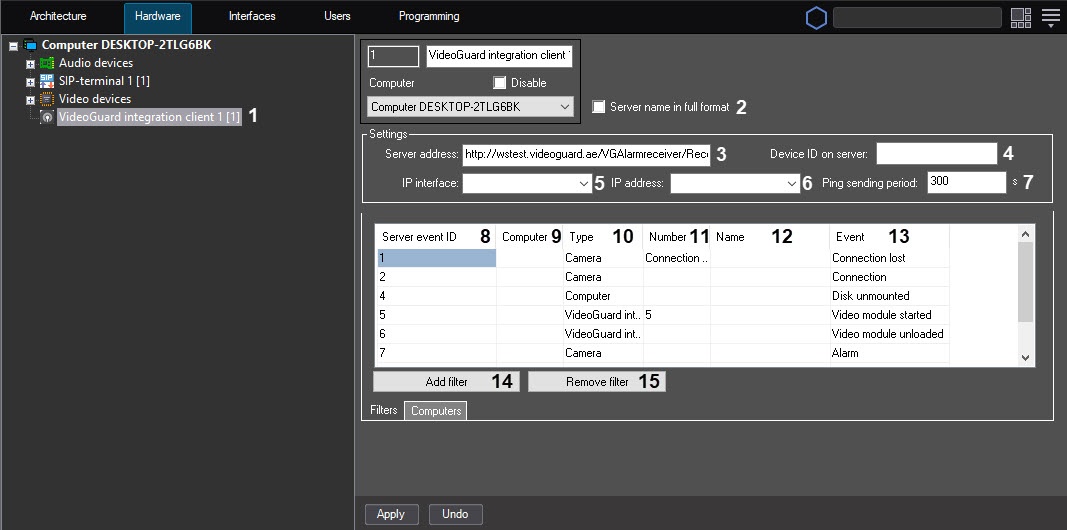
- Set the Server name in full format checkbox (2) if you want to display the full server name. By default, the short server name is displayed.
- In the Server address field (3), enter the connection address to the VideoGuard server.
- In the Device ID on server field (4), enter the identifier that is assigned by Axxon PSIM on the IP interface server. The field must contain no more than 12 digits.
- From the IP interface drop-down list (5), select the network adapter that is used to connect this computer to the VideoGuard server.
From the IP address drop-down list (6), select the IP address that is sent to VideoGuard as the Axxon PSIM server address.
Note
The IP address list displays all addresses from all available IP interfaces. If you specify the IP address that doesn't belong to the selected IP interface, the system sends the random IP address from those available in the selected IP interface.
- In the Ping sending period field (7), specify the Heart Beat message sending frequency in seconds. By default, the Heart Beat message is sent right after the Axxon PSIM starts and then every 5 minutes (300 seconds).
- Configure the correspondence between VideoGuard and Axxon PSIM events. By default, mandatory events are added to the correspondence table, and their correspondence with Axxon PSIM objects' events is configured. If necessary, you can change this correspondence and add or remove the additional events:
- From the Server event ID drop-down list (8), select the event identifier on the VideoGuard server. See the available values in the table at the end of the section.
- From the Computer drop-down list (9), select the name of the Computer object on the basis of which the selected objects must be created so that their events are sent to VideoGuard. If you don't specify the value, the events are sent from the specified objects, regardless of which Computer object they are based on. As a result, such events can be processed incorrectly in the VideoGuard system.
- From the Type drop-down list (10), select the Axxon PSIM object type, the events from which must be sent to the VideoGuard server.
- From the Number drop-down list (11), select the Axxon PSIM object identifier, the events from which must be sent to the VideoGuard server. If you don't specify the identifier, events are sent from all objects of the selected type.
- After you select the object type and identifier, the Name field (12) is automatically filled with the name of the selected Axxon PSIM object.
- From the Event drop-down list (13), select the event that is coming from the Axxon PSIM object of the selected type and that corresponds to the VideoGuard server event with the specified identifier.
- To add an event, click the Add filter button (14) and follow steps a-f to configure it.
- To remove an event, select the corresponding row in the table and click the Remove filter button (15).
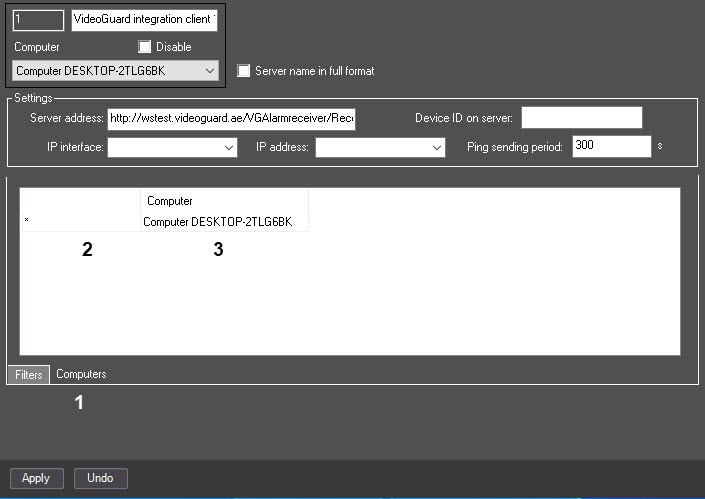
- If you create one VideoGuard integration client object and several Computer objects in the system, the connection loss events from all computers in the distributed system are transmitted to the VideoGuard software by default. If you don't want to transmit the connection loss events from any computers, go to the Computers tab (1) and clear the checkboxes (2) next to the corresponding Computer objects (3).
- Click the Apply button.
Configuring the integration with the VideoGuard system is complete.
After you connect to the VideoGuard server, you must restart Axxon PSIM to synchronize the time with the VideoGuard server. After you restart Axxon PSIM, the time zone in Windows OS is synchronized with the specified VideoGuard server. Subsequently, the Axxon PSIM server synchronizes with the NTP server of the VideoGuard system (by calling the GetNTPServerInfo method). During the synchronization, the VideoGuard system server reports the time synchronization period (120 seconds by default), and within 24 hours after the synchronization with the NTP server, the time synchronization is performed at the specified interval.
VideoGuard message filter
The VideoGuard message filter object is used to save the occurred events of the VideoGuard integration client in case the client loses connection with the server. When the connection with the server is restored, the saved events are transmitted to the server. The VideoGuard message filter saves only those events that you select in the settings for the VideoGuard integration client (event filter described above).
The order of configuration:
- Create the VideoGuard message filter object on the basis of the Computer object on the Hardware tab of the System settings dialog window.
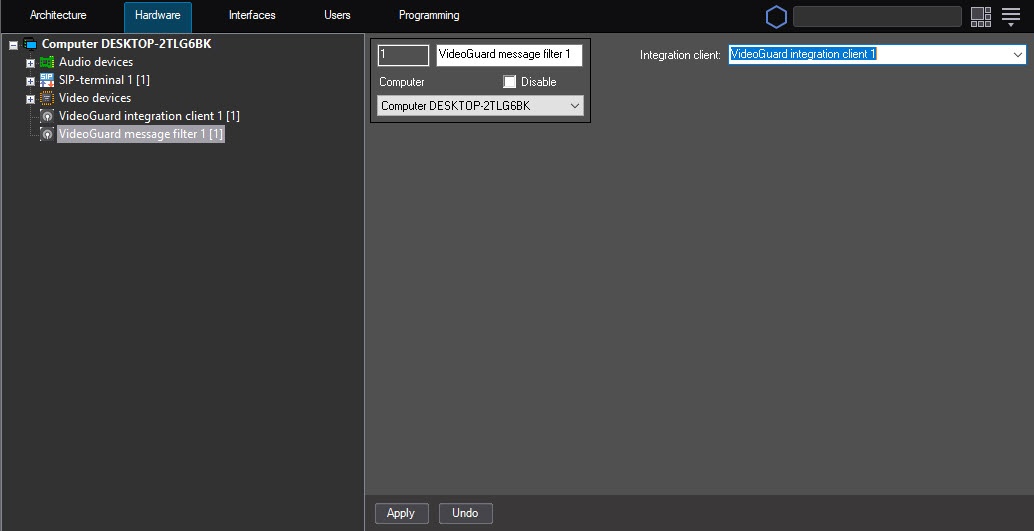
- From the Integration client drop-down list, select the VideoGuard integration client item, the events of which you want to save.
- Click the Apply button.
As a result, the VideoGuard message filter object that saves the events of the selected VideoGuard integration client when connection is lost is created.
Event identifiers
The event identifiers supported on the server:
| ID | Description | Corresponding Axxon PSIM event |
|---|---|---|
| 1 | No video signal | Camera: Connection lost |
| 2 | Video source connection | Camera: Connection |
| 3 | Disk overflow | NA |
| 4 | Error writing to disk | Computer: Disk unmounted |
| 5 | Client connection | VideoGuard integration client: The video module is started. Note. The event is generated in the following cases:
|
| 6 | Client disconnection | VideoGuard integration client: The video module is unloaded. Note. The event is generated in the following cases:
|
| 7 | Motion detector generates an event | Camera: Alarm |
| 8 | Case opening (Shelter Alarm) | NA |
| 9 | Start of the archive recording | Camera: Disk recording |
| 10 | End of the archive recording | Camera: Disk recording is stopped |
| 11 | Change the schedule of recording to the archive | NA |
| 100 | Additional event | Used to send additional events to the VideoGuard server. In this case, the event source identifier is added to the event identifier. Example:
The event with the identifier 101 is sent to the VideoGuard server |
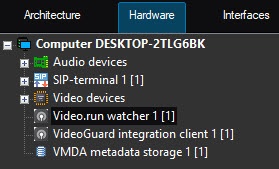

Note
If you add several servers to the configuration, then after you restart the main server, the events with the identifier 5 are sent to those servers that are enabled or were disabled at the time of the main server restart. At the same time, the event with the identifier 6 isn't sent to those servers that were disabled at the time of the main server restart.
Overview
Content Tools