
Go to documentation repository

Documentation for Axxon PSIM 2.0. Documentation for other versions of Axxon PSIM is available too.
Previous page Next page

To set the network settings of the Axxon PSIM SIP-terminal, do the following:
- Go to the settings panel of the SIP-terminal object.
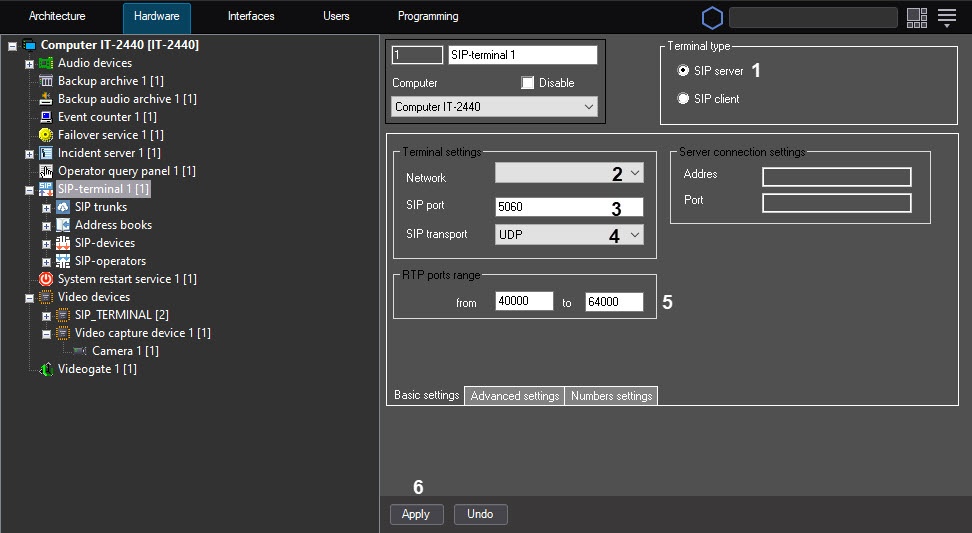
- Set the Terminal type switch to the SIP server position (1)—the SIP-terminal acts as a server, any SIP clients can connect to it, both Axxon PSIM-based and third-party SIP devices.
- From the Network drop-down list (2), select the IP address of the network adapter that is used to connect to the network where the SIP clients are located.
- In the SIP port field (3), specify the port number that receives the data from clients via the SIP protocol.
- From the SIP transport drop-down list (4), select the used transport level protocol: TCP or UDP.
- If necessary, specify the RTP port range in the corresponding text fields (5).
- Click the Apply button (6).
Setting the network settings of the Axxon PSIM SIP server is complete.
Overview
Content Tools