
Go to documentation repository

Documentation for Axxon PSIM 2.0. Documentation for other versions of Axxon PSIM is available too.
Previous page Next page

The administrator's password gives access to administrative functions of all components of the video surveillance and audio monitoring system. You can register only one administrator's password in a video surveillance and audio monitoring system built on Axxon PSIM. We recommend that you register the administrator's password on the administration server after you have configured the distributed architecture of the video surveillance system.
To register the administrator's password, do the following:
- Go to the Programming tab in the System settings window.
- Select the Security zone object in the object tree on the Programming tab. The settings panel for this object opens on the right side of the System settings window.
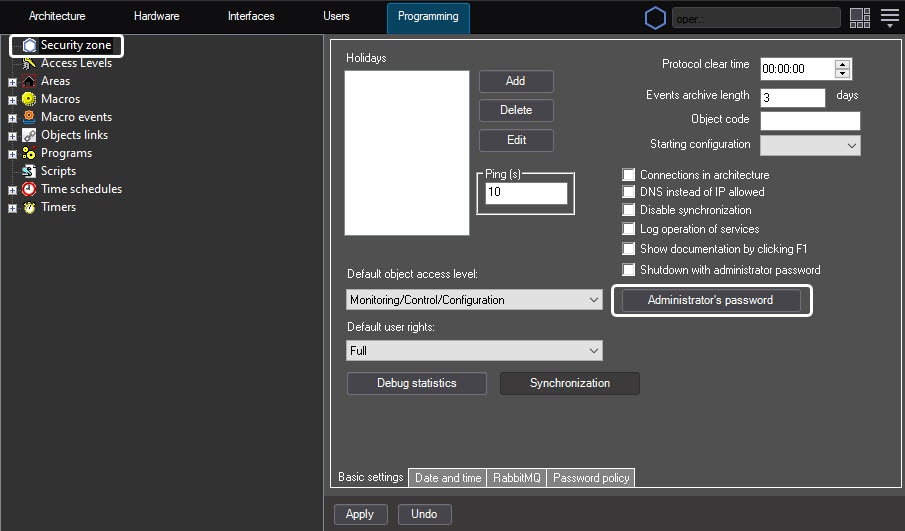
- Click the Administrator’s password button.
- The Set password window opens.
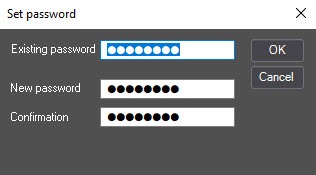
- In the Existing password field, enter the existing administrator’s password. If there is no administrator’s password, leave this field blank.
- In the New password field, enter the sequence of letters and figures that will be used as the administrator's password.
- In the Confirmation field, enter the new administrator’s password again.
- Click the OK button.
The Set password window closes.Note
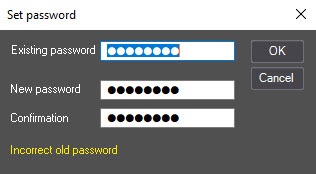
If you enter the incorrect existing password, the message Incorrect old password appears, and the new settings will not be saved.
- Click the Apply button in the System settings window.
The administrator’s password is now registered.
After you register the administrator’s password, a user with limited access rights can access the System settings window as an administrator in the following way:
- Open the main control panel.
- Press the Ctrl key on the keyboard.
- Select System settings in the menu.
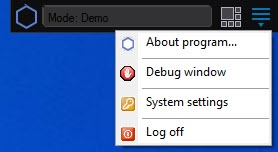
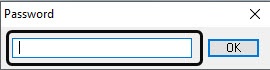
- Enter the administrator’s password and click the OK button.
Overview
Content Tools